
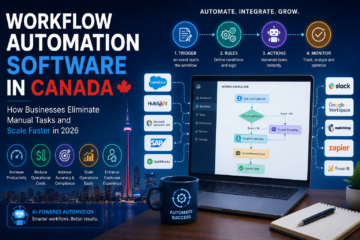
Workflow Automation Software Canada: Complete 2026 Guide

Businesses today face increasing pressure to do more with fewer resources. Teams are expected to manage growing workloads, respond faster to customers, reduce operational costs, and maintain high levels of productivity.

However, many organizations still rely on manual processes for tasks such as data entry, approvals, reporting, customer onboarding, invoicing, and communication. These repetitive activities consume valuable time, increase the risk of human error, and limit scalability.

This is where workflow automation software is transforming Canadian businesses.

By automating repetitive processes and connecting business systems, workflow automation allows organizations to improve efficiency, reduce costs, and focus on higher-value activities.

In this guide, we’ll explore what workflow automation software is, how it works, its benefits, use cases, implementation strategies, and why businesses across Canada are investing heavily in automation in 2026.

What Is Workflow Automation Software?

Workflow automation software is a technology solution that automates repetitive business processes using predefined rules, triggers, integrations, and artificial intelligence.

Instead of employees manually performing routine tasks, automated workflows execute actions automatically when specific conditions are met.

Examples include:

  • Automatically assigning leads to sales representatives
  • Sending invoices after project completion
  • Routing support tickets to the correct department
  • Approving purchase requests
  • Updating CRM records
  • Generating business reports
  • Processing documents and forms

The goal is to streamline operations while reducing manual intervention.

Why Workflow Automation Matters in 2026

Modern businesses use multiple software platforms for daily operations.

These often include:

  • CRM systems
  • ERP software
  • Accounting tools
  • Project management platforms
  • Customer support systems
  • HR software
  • Marketing automation platforms

Without automation, employees spend countless hours switching between systems and manually moving data.

Common challenges include:

  • Repetitive manual tasks
  • Delayed approvals
  • Data inconsistencies
  • Missed opportunities
  • High operational costs
  • Employee burnout

Workflow automation solves these challenges by creating seamless and intelligent business processes.

How Workflow Automation Software Works

Workflow automation typically follows a simple process:

Step 1: Trigger

An event initiates the workflow.

Examples:

  • A customer submits a form
  • A new lead enters the CRM
  • An invoice is created
  • A support ticket is opened

Step 2: Rules

Business logic determines what actions should occur.

Examples:

  • Assign lead based on location
  • Notify managers of high-value deals
  • Escalate urgent support requests

Step 3: Actions

The software automatically executes tasks.

Examples:

  • Update databases
  • Send emails
  • Generate reports
  • Create tasks
  • Sync systems

Step 4: Monitoring

Organizations track workflow performance and optimize processes over time.

Key Benefits of Workflow Automation Software

Increased Productivity

Employees spend less time on repetitive work and more time on strategic initiatives.

Reduced Operational Costs

Automation lowers labor costs and minimizes inefficiencies.

Improved Accuracy

Automated workflows eliminate many common human errors.

Faster Process Completion

Tasks that previously required hours or days can be completed within seconds.

Better Customer Experience

Faster response times improve customer satisfaction and retention.

Greater Scalability

Businesses can handle increasing workloads without significantly expanding their workforce.

Common Workflow Automation Use Cases

Sales Automation

Sales teams automate:

  • Lead qualification
  • Lead routing
  • Follow-up sequences
  • CRM updates
  • Pipeline management

Benefits include faster response times and improved conversion rates.

Customer Support Automation

Support teams automate:

  • Ticket creation
  • Issue categorization
  • Escalation workflows
  • Customer notifications

This improves service quality while reducing support costs.

Finance Automation

Finance departments automate:

  • Invoice processing
  • Expense approvals
  • Payment reminders
  • Financial reporting

Automation reduces administrative work and improves compliance.

Human Resources Automation

HR teams automate:

  • Employee onboarding
  • Leave requests
  • Performance reviews
  • Recruitment workflows

This improves employee experiences while reducing administrative burden.

Marketing Automation

Marketing teams automate:

  • Email campaigns
  • Lead nurturing
  • Customer segmentation
  • Performance reporting

This enables more personalized and efficient marketing efforts.

AI-Powered Workflow Automation

Artificial Intelligence is taking automation beyond simple rule-based processes.

Modern AI-powered workflow automation can:

  • Analyze documents automatically
  • Classify customer requests
  • Generate content
  • Predict outcomes
  • Recommend actions
  • Process unstructured data

Examples include:

  • AI chatbots handling customer inquiries
  • Intelligent document processing
  • AI-powered lead scoring
  • Predictive sales forecasting

These capabilities allow businesses to automate increasingly complex workflows.

Industries Benefiting from Workflow Automation in Canada

Healthcare

Healthcare organizations automate:

  • Patient onboarding
  • Appointment scheduling
  • Insurance processing
  • Compliance documentation

Financial Services

Banks and fintech companies automate:

  • Loan applications
  • KYC verification
  • Fraud detection
  • Customer onboarding

Manufacturing

Manufacturers automate:

  • Inventory management
  • Procurement workflows
  • Quality control reporting
  • Supply chain coordination

Retail & E-Commerce

Retail businesses automate:

  • Order processing
  • Inventory updates
  • Customer communication
  • Marketing campaigns

Professional Services

Consulting firms and agencies automate:

  • Project management
  • Proposal generation
  • Client onboarding
  • Reporting workflows

Workflow Automation vs Traditional Business Processes

FeatureManual ProcessesWorkflow Automation
SpeedSlowFast
ScalabilityLimitedHigh
Error RateHighLow
ReportingManualAutomated
Operational CostHigherLower
Customer ExperienceInconsistentImproved

The difference becomes more significant as organizations grow and manage larger volumes of work.

Key Features to Look for in Workflow Automation Software

When evaluating automation platforms, businesses should look for:

Drag-and-Drop Workflow Builder

Allows non-technical teams to create workflows easily.

API Integrations

Connects automation tools with existing business systems.

AI Capabilities

Supports intelligent decision-making and advanced automation.

Analytics & Reporting

Provides visibility into workflow performance.

Security & Compliance

Protects sensitive business information.

Scalability

Supports future business growth.

Common Challenges During Automation Projects

Poor Process Documentation

Automating inefficient processes can create larger problems.

Integration Complexity

Legacy systems may require custom integration work.

Employee Resistance

Teams may initially resist workflow changes.

Data Quality Issues

Automation depends on accurate and reliable data.

Lack of Strategy

Organizations should align automation projects with business goals.

Best Practices for Successful Workflow Automation

Start Small

Begin with high-volume repetitive tasks.

Map Existing Processes

Understand current workflows before automating them.

Define Success Metrics

Examples include:

  • Time savings
  • Cost reduction
  • Error reduction
  • Productivity improvements

Integrate Existing Systems

Connect automation software with CRM, ERP, and other business applications.

Continuously Optimize

Review workflow performance regularly and improve processes over time.

The Future of Workflow Automation in Canada

Several trends are driving automation adoption:

AI Agents

Autonomous AI agents can manage entire business workflows with minimal human involvement.

Hyperautomation

Businesses are combining:

  • AI
  • Workflow automation
  • Analytics
  • System integrations

to automate end-to-end operations.

Intelligent Decision-Making

AI-powered workflows increasingly support strategic business decisions.

Real-Time Operations

Organizations are moving toward instant processing and real-time automation.

Why Canadian Businesses Are Investing in Workflow Automation

Companies across Canada are embracing automation to:

  • Improve efficiency
  • Reduce operational costs
  • Enhance customer experiences
  • Increase employee productivity
  • Accelerate growth
  • Gain competitive advantages

Organizations that successfully automate their workflows can scale faster while maintaining operational excellence.

Final Thoughts

Workflow automation software has become a critical technology investment for modern businesses. As competition increases and customer expectations continue to rise, organizations need smarter ways to manage operations.

By automating repetitive tasks, integrating business systems, and leveraging AI-powered workflows, Canadian businesses can reduce costs, improve efficiency, and create scalable operations prepared for future growth.

Whether you’re automating sales processes, customer support, finance operations, HR workflows, or enterprise-wide business functions, workflow automation provides a powerful foundation for long-term success in 2026 and beyond.


System Integration Services Canada: Complete 2026 Guide

Modern businesses rely on dozens of software applications to manage operations. Customer data lives in a CRM, financial information sits in an ERP system, marketing teams use automation platforms, and support teams depend on helpdesk software.

While these tools are powerful individually, they often create disconnected workflows when they don’t communicate with each other.

This is why system integration services have become a critical investment for Canadian businesses. By connecting CRM systems, ERP platforms, AI tools, cloud applications, and internal databases, organizations can eliminate data silos, automate workflows, and improve operational efficiency.

In this guide, we’ll explore what system integration services are, why they matter, common integration methods, implementation strategies, costs, and how Canadian businesses are leveraging integrations to accelerate growth in 2026.


What Are System Integration Services?

System integration services involve connecting multiple software applications, databases, cloud platforms, and business systems so they can exchange information automatically.

Instead of employees manually transferring data between systems, integrations enable real-time communication and automation.

Examples include:

  • Connecting Salesforce with QuickBooks
  • Syncing HubSpot with an ERP platform
  • Integrating AI chatbots with CRM systems
  • Connecting eCommerce platforms with inventory software
  • Synchronizing customer data across departments
  • Automating reporting dashboards

The goal is simple: create a unified digital ecosystem where information flows seamlessly between systems.


Why Businesses Need System Integration

Many organizations operate with disconnected software.

A typical company may use:

  • CRM software for sales
  • ERP systems for operations
  • Accounting software for finance
  • HR platforms for employee management
  • Marketing automation tools
  • Customer support systems
  • Business intelligence dashboards

Without integration, teams spend hours manually updating information.

Common challenges include:

  • Duplicate data entry
  • Data inconsistencies
  • Delayed reporting
  • Human errors
  • Reduced productivity
  • Poor customer experience

System integration eliminates these problems by ensuring all systems remain synchronized automatically.


Key Benefits of System Integration Services

Improved Operational Efficiency

Employees spend less time performing repetitive administrative tasks and more time focusing on strategic initiatives.

Real-Time Data Access

Integrated systems ensure everyone works with current information.

This improves:

  • Decision-making
  • Forecasting
  • Customer service
  • Financial reporting

Reduced Human Errors

Manual data entry often results in mistakes.

Automated integrations significantly improve accuracy.

Better Customer Experience

When customer information is shared across departments, businesses can deliver faster and more personalized experiences.

Increased Scalability

As businesses grow, integrated systems can handle larger volumes of data and transactions without increasing administrative overhead.


Common Types of System Integrations

CRM Integration

Customer Relationship Management (CRM) systems are often the center of business operations.

Popular CRM integrations include:

  • Salesforce
  • HubSpot
  • Zoho CRM
  • Microsoft Dynamics 365

CRM integration allows businesses to:

  • Synchronize customer data
  • Track sales performance
  • Automate lead management
  • Improve customer service

Organizations often combine CRM integrations with custom CRM software development to support unique workflows.


ERP Integration

Enterprise Resource Planning (ERP) platforms manage core business processes.

Common ERP systems include:

  • SAP
  • Oracle ERP
  • Microsoft Dynamics
  • NetSuite

ERP integrations help businesses:

  • Manage inventory
  • Track finances
  • Monitor procurement
  • Improve resource planning

When connected with CRM systems, organizations gain complete visibility across customer and operational processes.


AI Platform Integration

AI solutions are becoming increasingly common across industries.

Businesses integrate AI technologies with:

  • CRM systems
  • ERP software
  • Customer support platforms
  • Analytics tools
  • Workflow automation software

Examples include:

  • AI chatbots accessing customer records
  • Predictive analytics using ERP data
  • Intelligent document processing systems
  • AI-powered workflow automation

These integrations allow organizations to unlock greater value from their data.


Cloud Application Integration

Modern businesses use numerous cloud-based applications.

Examples include:

  • Microsoft 365
  • Google Workspace
  • Slack
  • Asana
  • Trello
  • Dropbox

Cloud integrations create seamless collaboration between teams while reducing manual work.


Popular Integration Methods

API-Based Integration

Application Programming Interfaces (APIs) are the most common integration method.

APIs enable software applications to communicate securely and exchange information in real time.

Benefits include:

  • Fast communication
  • High scalability
  • Improved security
  • Real-time synchronization

API integrations are ideal for modern cloud-based environments.


Middleware Integration

Middleware acts as a bridge between multiple applications.

It enables organizations to connect systems without extensive redevelopment.

Benefits include:

  • Simplified integrations
  • Centralized data management
  • Easier maintenance

Database Integration

Database integration allows multiple systems to share information through centralized databases.

This approach is common in enterprise environments where data consistency is essential.


Event-Driven Integration

Event-driven architectures automatically trigger actions when specific events occur.

Examples:

  • New lead created
  • Customer places an order
  • Invoice generated
  • Support ticket submitted

This approach enables highly automated business workflows.


Industries Benefiting from System Integration in Canada

Healthcare

Healthcare organizations integrate systems to:

  • Manage patient records
  • Improve compliance
  • Streamline scheduling
  • Coordinate care delivery

Finance

Financial institutions use integrations for:

  • Payment processing
  • Fraud detection
  • Customer onboarding
  • Regulatory reporting

Manufacturing

Manufacturers connect:

  • Production systems
  • Inventory platforms
  • Supply chain software
  • ERP solutions

This improves operational visibility and efficiency.


Retail & eCommerce

Retail businesses integrate:

  • Online stores
  • Inventory systems
  • Payment gateways
  • Customer databases

The result is improved order management and customer experience.


Challenges Businesses Face During Integration Projects

Legacy Systems

Older software may lack modern APIs or integration capabilities.

Data Quality Issues

Poor data quality can negatively impact integration outcomes.

Security Concerns

Sensitive business data must be protected throughout the integration process.

Scalability Requirements

Businesses should ensure integration architecture can support future growth.

Change Management

Teams need training to adapt to new workflows and processes.


Best Practices for Successful System Integration

Define Clear Business Goals

Start with measurable objectives such as:

  • Reducing manual work
  • Improving reporting accuracy
  • Enhancing customer experience
  • Increasing operational efficiency

Audit Existing Systems

Evaluate:

  • Current software stack
  • Data sources
  • Existing workflows
  • Integration requirements

Prioritize Security

Implement:

  • Encryption
  • Authentication controls
  • Access management
  • Compliance standards

Choose Scalable Architecture

Integration solutions should support future growth and evolving business requirements.


Monitor Performance

Track KPIs such as:

  • Data accuracy
  • Workflow completion times
  • Productivity improvements
  • Cost savings

How AI Is Transforming System Integration

Artificial Intelligence is changing how integrations operate.

Modern AI-powered integrations can:

  • Automatically classify data
  • Detect anomalies
  • Generate predictive insights
  • Optimize workflows
  • Process documents intelligently
  • Recommend automation opportunities

Organizations increasingly combine AI solutions with traditional integrations to create intelligent business ecosystems.

For example, AI agents can automatically pull information from CRMs, analyze ERP data, generate reports, and trigger business actions without human intervention.


The Future of System Integration in Canada

Several trends are shaping the future of integrations:

AI-Driven Automation

Businesses are moving beyond simple integrations toward intelligent workflows.

Hyperautomation

Organizations are combining:

  • AI
  • Automation
  • Integrations
  • Analytics

to create highly efficient operations.

Real-Time Data Ecosystems

Companies increasingly expect immediate access to business insights across all systems.

Cloud-First Architectures

Cloud platforms continue to drive integration innovation and scalability.


Why Canadian Businesses Are Investing in System Integration Services

As organizations adopt more software solutions, maintaining disconnected systems becomes increasingly costly.

System integration enables businesses to:

  • Improve efficiency
  • Reduce operational costs
  • Increase productivity
  • Enhance customer experiences
  • Support digital transformation
  • Maximize technology investments

Businesses that successfully connect their CRM, ERP, AI, and cloud platforms gain a significant competitive advantage in today’s fast-moving digital economy.


Final Thoughts

System integration services are no longer optional for growing businesses. As software ecosystems become more complex, organizations need seamless communication between CRM platforms, ERP systems, AI tools, cloud applications, and business databases.

By investing in strategic system integration, Canadian businesses can eliminate data silos, automate workflows, improve decision-making, and create scalable digital operations ready for future growth.

Whether you’re integrating a CRM, ERP platform, AI solution, or an entire technology stack, the right integration strategy can unlock greater efficiency, productivity, and long-term business value.

Intelligent Data Processing in Canada: 2026 Guide

Every business generates enormous amounts of data. Customer inquiries, invoices, contracts, emails, support tickets, reports, spreadsheets, and operational records accumulate daily. Yet many organizations struggle to transform this information into meaningful insights that drive growth.

This is where Intelligent Data Processing (IDP) is changing the game.

Across Canada, businesses are adopting AI-powered data processing solutions to automate repetitive tasks, improve accuracy, reduce operational costs, and make faster decisions. From healthcare and finance to logistics and retail, intelligent data processing is becoming a core component of digital transformation strategies.

In this guide, we’ll explore what intelligent data processing is, how it works, its benefits, use cases, implementation strategies, and why Canadian businesses are investing in AI-powered automation.

What Is Intelligent Data Processing?

Intelligent Data Processing (IDP) combines Artificial Intelligence (AI), Machine Learning (ML), Natural Language Processing (NLP), Optical Character Recognition (OCR), and automation technologies to extract, classify, analyze, and process data from structured and unstructured sources.

Unlike traditional data entry systems that rely heavily on manual work, IDP can automatically:

  • Extract information from documents
  • Read handwritten or scanned forms
  • Process invoices and receipts
  • Analyze emails and customer communications
  • Categorize business documents
  • Generate insights from large datasets
  • Automate repetitive workflows

The result is faster processing, improved accuracy, and reduced operational overhead.

Why Intelligent Data Processing Matters in 2026

Modern businesses collect more information than ever before. However, much of that data remains trapped inside PDFs, emails, spreadsheets, contracts, and legacy systems.

Without automation, organizations face:

  • Manual data entry errors
  • Slow decision-making
  • High operational costs
  • Compliance risks
  • Employee productivity challenges
  • Data silos across departments

Intelligent Data Processing helps organizations convert raw information into actionable business intelligence while eliminating repetitive manual tasks.

How Intelligent Data Processing Works

1. Data Collection

The system gathers information from various sources:

  • PDFs
  • Scanned documents
  • Emails
  • Databases
  • CRM systems
  • ERP platforms
  • Web forms
  • Cloud applications

2. Data Extraction

Using OCR and AI technologies, relevant information is identified and extracted automatically.

Examples include:

  • Invoice numbers
  • Customer names
  • Payment details
  • Contract terms
  • Product information

3. Data Classification

AI models categorize information into predefined groups.

Examples:

  • Financial documents
  • Legal agreements
  • Customer requests
  • Purchase orders
  • Support tickets

4. Data Validation

Business rules and machine learning models verify the extracted information to improve accuracy.

5. Analytics and Insights

Processed data is transformed into dashboards, reports, and actionable insights that support decision-making.

Businesses implementing intelligent analytics often integrate custom reporting solutions through dashboard platforms to gain real-time visibility into operations.

Key Benefits of Intelligent Data Processing

Improved Efficiency

Tasks that previously required hours of manual work can be completed in minutes.

Reduced Costs

Automation lowers labor costs while reducing the need for repetitive administrative work.

Better Accuracy

AI-powered systems significantly reduce human errors associated with manual data handling.

Faster Decision-Making

Executives gain access to real-time insights rather than waiting for manual reporting processes.

Scalability

Organizations can process thousands of documents without increasing staffing requirements.

Enhanced Customer Experience

Faster access to information leads to quicker customer service responses and improved satisfaction.

Industry Use Cases in Canada

Healthcare

Healthcare providers use intelligent data processing to:

  • Process patient records
  • Manage insurance documentation
  • Automate appointment workflows
  • Improve compliance reporting

Healthcare organizations implementing AI solutions often combine IDP with healthcare software and automation initiatives.

Financial Services

Banks and fintech companies leverage IDP for:

  • Loan processing
  • KYC verification
  • Fraud detection
  • Document management

Manufacturing

Manufacturers use intelligent data processing to:

  • Analyze production reports
  • Manage supplier documentation
  • Automate inventory records
  • Monitor operational performance

Logistics and Transportation

IDP helps logistics companies process:

  • Shipping documents
  • Delivery confirmations
  • Customs paperwork
  • Fleet management data

Retail and E-commerce

Retail businesses automate:

  • Product catalog management
  • Customer support requests
  • Order processing
  • Inventory reporting

Intelligent Data Processing vs Traditional Automation

FeatureTraditional AutomationIntelligent Data Processing
Handles Unstructured DataLimitedYes
Learns Over TimeNoYes
Uses AI ModelsNoYes
Extracts ContextLimitedAdvanced
ScalabilityModerateHigh
Decision SupportBasicAdvanced

The major advantage of IDP is its ability to understand and process information that does not follow a fixed format.

Common Technologies Used in Intelligent Data Processing

Modern IDP solutions typically combine:

  • Artificial Intelligence
  • Machine Learning
  • Natural Language Processing (NLP)
  • Optical Character Recognition (OCR)
  • Robotic Process Automation (RPA)
  • Business Intelligence Platforms
  • Cloud Infrastructure
  • Data Analytics Engines

Many organizations integrate these technologies with existing CRM, ERP, and business applications to create unified workflows.

Challenges Businesses Should Consider

While IDP offers significant benefits, successful implementation requires planning.

Common challenges include:

Data Quality Issues

Poor-quality data can impact AI model performance.

Integration Complexity

Connecting legacy systems with modern AI solutions may require custom integration work.

Security and Compliance

Organizations must ensure compliance with Canadian privacy regulations and data protection requirements.

Change Management

Employees need training to adapt to new automated workflows.

How to Successfully Implement Intelligent Data Processing

Start With High-Volume Processes

Focus on tasks involving repetitive data entry or document processing.

Define Business Objectives

Identify measurable goals such as:

  • Cost reduction
  • Faster processing times
  • Improved accuracy
  • Better customer experience

Integrate Existing Systems

Connect IDP platforms with:

  • CRM systems
  • ERP software
  • Customer support tools
  • Analytics platforms

Monitor Performance

Track KPIs including:

  • Processing speed
  • Accuracy rates
  • Cost savings
  • Employee productivity improvements

Continuously Optimize

AI models improve over time when trained with quality business data.

Future Trends in Intelligent Data Processing

Over the next few years, Canadian businesses can expect:

AI Agents Handling Complex Workflows

Autonomous AI agents will manage multi-step business processes with minimal human intervention.

Real-Time Business Intelligence

Organizations will gain immediate insights from continuously processed data streams.

Predictive Analytics

Businesses will use historical and real-time data to forecast trends and improve decision-making.

Hyperautomation

IDP will become part of larger automation ecosystems combining AI, workflows, integrations, and business intelligence.

Why Canadian Businesses Are Investing in Intelligent Data Processing

The pressure to reduce costs, improve efficiency, and remain competitive is driving rapid adoption of AI-powered solutions.

Organizations that successfully implement intelligent data processing can:

  • Increase productivity
  • Improve decision-making
  • Reduce operational expenses
  • Deliver better customer experiences
  • Scale operations more efficiently

As AI technologies continue to mature, intelligent data processing is quickly becoming a competitive necessity rather than a future innovation.

Final Thoughts

Intelligent Data Processing is transforming how Canadian businesses manage and utilize information. By combining AI, machine learning, automation, and analytics, organizations can unlock valuable insights while eliminating inefficient manual processes.

Whether you’re processing invoices, customer requests, contracts, operational reports, or enterprise data, IDP provides a scalable path toward smarter decision-making and business growth.

Companies that invest in intelligent data processing today will be better positioned to compete in an increasingly data-driven economy throughout 2026 and beyond.