
What Is a Push Notification? A Complete Guide for 2026
You have seen thousands of them today without thinking about it. A ride is arriving. A payment cleared. A teammate mentioned you. A flight gate changed. Each of those small messages that slides onto your lock screen is a push notification, and for most apps it is the single most direct line to the people who installed them.
Used well, push notifications bring people back at the right moment with something they actually want to know. Used badly, they are the fastest way to get an app muted or deleted. This guide explains what a push notification is, how the technology works on iOS, Android and the web, the main types, the benefits, the rules (including privacy and consent considerations for Canadian businesses), and how to measure whether your notifications are working.
Key takeaways
- A push notification is a short message sent from an app or website to a user's device, which appears even when the app or site is not open.
- Every push goes through a platform service: Apple Push Notification service (APNs) for Apple devices, Firebase Cloud Messaging (FCM) for Android, and browser push services for the web.
- Users must give permission. On iOS this has always been opt-in; on Android it has been opt-in since Android 13; on the web every site must ask.
- The main types are transactional (account and order updates), promotional (offers and campaigns) and event-triggered (sent because of something the user did or did not do).
- The best notifications are personal, timely, clear and rare enough to stay welcome. Measure opt-in rate, open rate, conversions and opt-outs, not just sends.
What Is a Push Notification?
A push notification is a short, clickable message that an app or website sends to a user's device. It appears outside the app itself, on the lock screen, in the notification centre, as a banner at the top of the screen, or on a smartwatch, so the user sees it even when the app is closed.
The word "push" describes who starts the conversation. In normal browsing, the user "pulls" information by opening an app or loading a page. With push, the server sends the information to the device without the user asking for it in that moment. The user agreed to receive these messages earlier, when they allowed notifications.
Tapping a notification usually opens the app or website on a specific screen, such as the order that shipped, the message that arrived or the offer being promoted. That ability to take the user straight to the right place is what makes push so useful for both the user and the business.
Where push notifications appear
- Lock screen: shown when the device is locked, often the first thing a person sees when they pick up their phone.
- Banners and heads-up alerts: appear briefly at the top of the screen while the device is in use.
- Notification centre or shade: a history of notifications the user has not yet cleared.
- App icon badges: a counter or dot on the app icon showing there is something new.
- Wearables and desktops: smartwatches mirror phone notifications, and browsers can show web push notifications on desktop computers.
A Short History of Push Notifications
Push technology is older than the smartphone app store. In the early 2000s, BlackBerry made "push email" famous: new messages arrived on the device automatically instead of waiting for the user to check. That always-on delivery was a big part of why BlackBerry became the standard business phone.
Apple brought push to third-party apps in 2009, when it launched the Apple Push Notification service with iPhone OS 3.0. Instead of every app running in the background and draining the battery, Apple kept one efficient connection open between each device and its servers, and apps sent their messages through that connection.
Google followed with Cloud to Device Messaging (C2DM) in 2010, replaced it with Google Cloud Messaging in 2012, and then moved developers to Firebase Cloud Messaging, which is the standard for Android today. Web push arrived later: Safari supported it on the Mac from 2013, Chrome added the standard Push API in 2015, and Apple added web push for Home Screen web apps on iPhone and iPad with iOS 16.4 in 2023.
Over the same years, notifications became richer (images, buttons, live updates) and users gained far more control (permission prompts, Focus modes, notification summaries and per-category settings). That control is the reason relevance matters more today than volume.
Why Are Push Notifications Important?
Most people install many more apps than they use regularly. Without a reason to come back, an app quietly drops out of daily life. Push notifications are one of the few channels that reach users outside the app, on the device they carry everywhere, at no cost per message.
For users, good notifications are a service: they confirm that something happened, warn them about something that needs attention, or remind them of something they asked to be reminded about. For businesses, they support retention, engagement and revenue. The important point is that both sides benefit only when the message is useful. A notification that helps the user also helps the business; a notification that only helps the business is usually the one that gets the app muted.
How Do Push Notifications Work?
Every push notification passes through a few parties. Understanding them helps product owners make better decisions about tools, timing and data.
The main components
- The app or website (client): asks the user for permission and registers with the platform's push service.
- The operating system push service: APNs for Apple devices, FCM for Android, and the browser vendor's push service for web push. These services hold a secure connection to each device and deliver the message.
- The device token: a unique address the push service gives to each app installation. Your server needs it to send a message to that device.
- Your app server or backend: decides who should get which message and when, then sends it to the push service.
- A push provider (optional): a platform such as OneSignal, Firebase, Braze, MoEngage or Airship that adds segmentation, scheduling, A/B testing and analytics on top of the raw services.
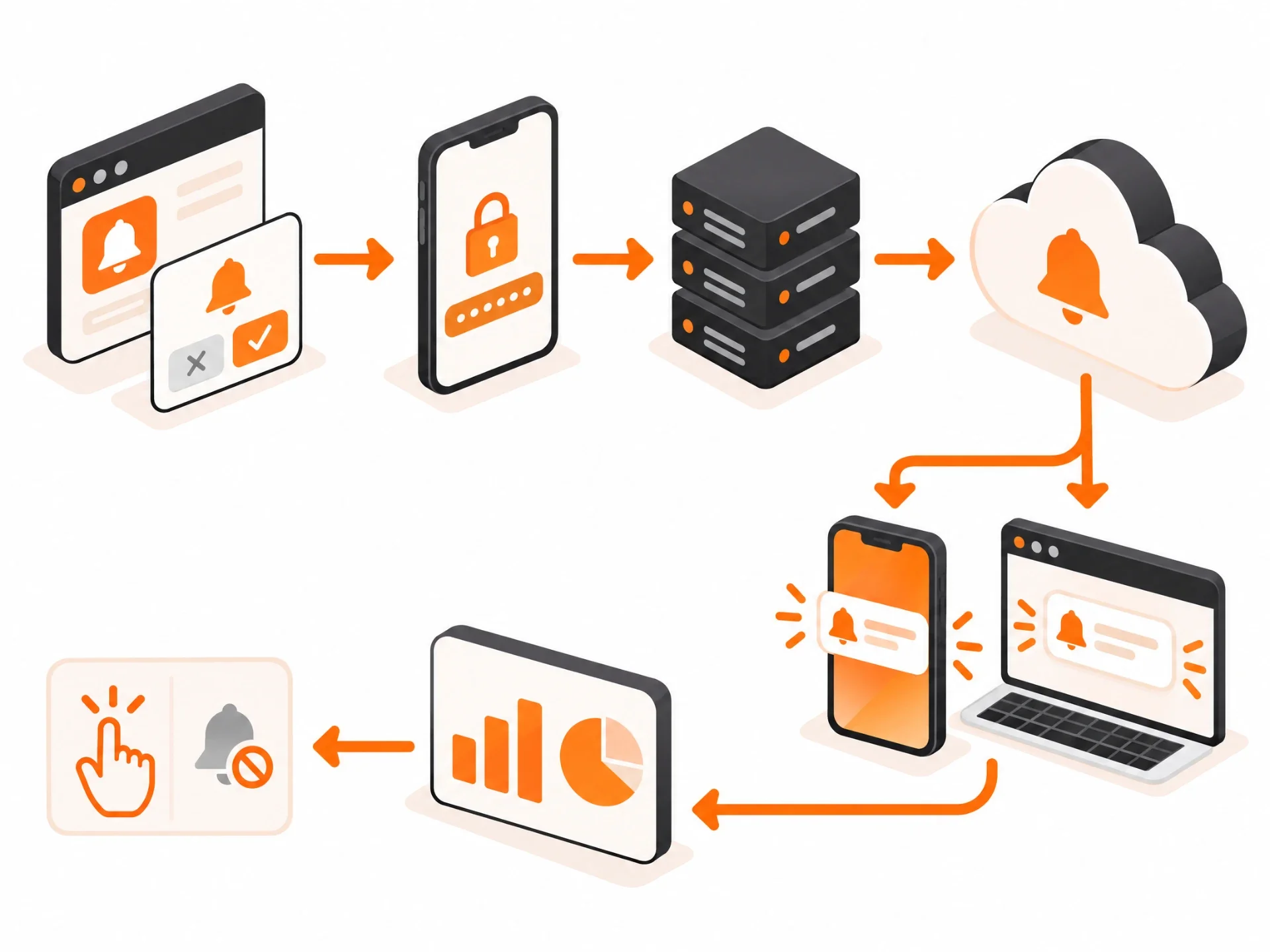
Step by step
- The user installs the app (or visits the website) and is asked to allow notifications.
- If the user agrees, the app registers with APNs, FCM or the browser push service and receives a device token or subscription.
- The app sends that token to your backend, where it is stored against the user's profile and preferences.
- When something happens (an order ships, a message arrives, a campaign launches), your backend builds a message, called the payload, and sends it with the token to the push service.
- The push service delivers the message to the device, which displays it according to the user's settings.
- The user taps, dismisses or ignores it, and the app reports that interaction back for analytics.
Payloads are small. APNs and FCM limit standard notification payloads to about 4 KB, so the message carries text and links, while images and other media are fetched separately by the device.
Implementing push on each platform
- iOS (APNs): the app requests authorization, registers for remote notifications and sends its token to the server. The server authenticates with Apple using a token-based key or certificate. A Notification Service Extension can modify incoming messages, for example to download an image or decrypt content.
- Android (FCM): the app integrates the Firebase SDK, receives a registration token and, on Android 13 and later, asks for the POST_NOTIFICATIONS runtime permission. Developers also define notification channels so users can control each category separately.
- Web push: the site registers a service worker, asks permission through the browser and creates a push subscription using the standard Push API. Messages are encrypted and sent through the browser's push service.
The role of push service providers
You can send notifications directly through APNs and FCM, and many teams do. A push provider becomes valuable when you need cross-platform sending from one dashboard, audience segmentation, scheduling by time zone, automated journeys, experimentation and reporting. The trade-off is cost and sharing user data with another vendor, which is why the choice should be made together with your privacy and data plans.
Web Push vs App Push Notifications
Push notifications come in two main delivery forms, and they suit different situations.
| Mobile app push | Web push | |
|---|---|---|
| Requires | An installed app | A browser visit and permission (on iPhone, the site must be added to the Home Screen) |
| Delivery service | APNs (Apple) and FCM (Android) | Browser push services (Chrome, Firefox, Safari, Edge) |
| Where it shows | Lock screen, banners, notification centre, watch | Desktop notification area, and mobile notification shade |
| Rich features | Images, buttons, live updates, deep links, badges | Title, body, icon, image (browser dependent), buttons on some browsers |
| Best for | Engaged users, transactions, real-time updates | Re-engaging website visitors and content readers without an app |
Many businesses use both: web push to stay in touch with website visitors who are not ready to install an app, and app push for users who have committed to the product.
What Do Push Notifications Look Like? Anatomy of a Notification
Exact layouts differ between iOS, Android and browsers, but most notifications share the same building blocks. Using the iOS layout as an example:
- App icon: identifies who sent the message. It comes from the app itself and cannot be changed per message, which is one reason a recognizable icon matters.
- Title: a short headline in bold. Keep it specific and front-load the important words, because long titles get cut off.
- Timestamp: shows when the message arrived, which helps users judge whether it is still relevant.
- Message (body): the main text. Aim for one clear idea. Lock screens show only a couple of lines before truncating.
- Rich media: an image, GIF or video thumbnail shown when the notification is expanded. Useful for products, maps and previews.
- Action buttons: quick replies or actions such as "Reply", "Track order" or "Snooze" that work without opening the full app. Android supports up to three action buttons per notification.
Behind the visible parts sit settings the user never sees directly: the deep link that decides which screen opens, the notification category or channel, the priority or interruption level, the sound, and the badge count.
Types of Push Notifications
The most useful way to group notifications is by why they are sent.
Transactional notifications
Triggered by an action or account event the user expects to hear about: order confirmations, shipping updates, payment receipts, password resets, two-factor codes, appointment confirmations and booking changes. These are usually the most welcome notifications because they answer a question the user already has.
Promotional (marketing) notifications
Sent to drive sales or engagement: offers, new product launches, seasonal campaigns, loyalty rewards and content announcements. They work when they are targeted and occasional, and backfire when they are generic and frequent.
Event-triggered (behavioural) notifications
Sent automatically because of something the user did or did not do: an abandoned cart, an unfinished onboarding step, a streak about to break, a price drop on a saved item, or inactivity for a number of days. Because they are tied to the individual's behaviour, they tend to perform better than broadcast messages.
Other common types
- Informational and news alerts: breaking news, weather warnings, sports scores.
- Reminders: appointments, medication schedules, renewals, tasks the user set.
- Social and collaboration: messages, mentions, comments, likes and invitations.
- Location-based: messages triggered when a user enters an area, such as a store or airport, with location permission granted.
- Rich and interactive: notifications with images, carousels or action buttons.
- Live and ongoing: progress that updates on the lock screen, such as delivery tracking or a ride on its way (Live Activities on iOS, ongoing notifications on Android).
- Silent (background) notifications: not shown to the user at all; they tell the app to refresh data in the background.
Transactional vs marketing: why the difference matters
Keep transactional and promotional messages in separate categories (Android notification channels and iOS notification categories make this easy). If a user tires of offers, they can switch those off without losing order or security alerts. Mixing them means one annoyed tap can silence everything, including the messages your product depends on.
Benefits of Push Notifications
- Visibility. Notifications appear on the screen people look at most, even when your app is closed. Email can sit unread in an inbox; a push is seen within moments.
- Higher retention. Timely reminders and updates give users reasons to return, especially in the first days after install when most apps lose the bulk of their new users.
- Stronger engagement. Personal, relevant messages (a reply, a saved item back in stock, a goal reached) pull people into meaningful actions inside the app.
- More conversions. Cart reminders, price-drop alerts and limited-time offers can recover revenue that would otherwise be lost.
- A connected user experience. Push links the app, the website, email and in-app messages into one journey, so the user picks up exactly where they left off.
- Scale at low cost. Once the system is built, sending to thousands or millions of users costs very little per message compared with SMS or paid advertising.
- Real-time service. Security alerts, fraud warnings, delivery changes and appointment updates are delivered the moment they matter.
How Push Notifications Are Used Across Industries
| Industry | Typical uses |
|---|---|
| Retail and e-commerce | Order and delivery updates, back-in-stock and price-drop alerts, cart reminders, loyalty rewards |
| Banking and fintech | Transaction alerts, fraud warnings, bill and payment reminders, sign-in confirmations |
| Healthcare | Appointment reminders, prescription refill alerts, care-plan check-ins (with privacy-safe wording) |
| Travel and transport | Gate changes, boarding times, ride arrivals, booking confirmations |
| Media and news | Breaking news, new episodes, live scores, personalised content picks |
| SaaS and productivity | Mentions, task assignments, approvals, usage limits, billing and security alerts |
| Industrial and field apps | Equipment alerts, safety warnings, job dispatch and shift updates |
| Education | Class reminders, assignment due dates, grades and announcements |
Push Notification Best Practices
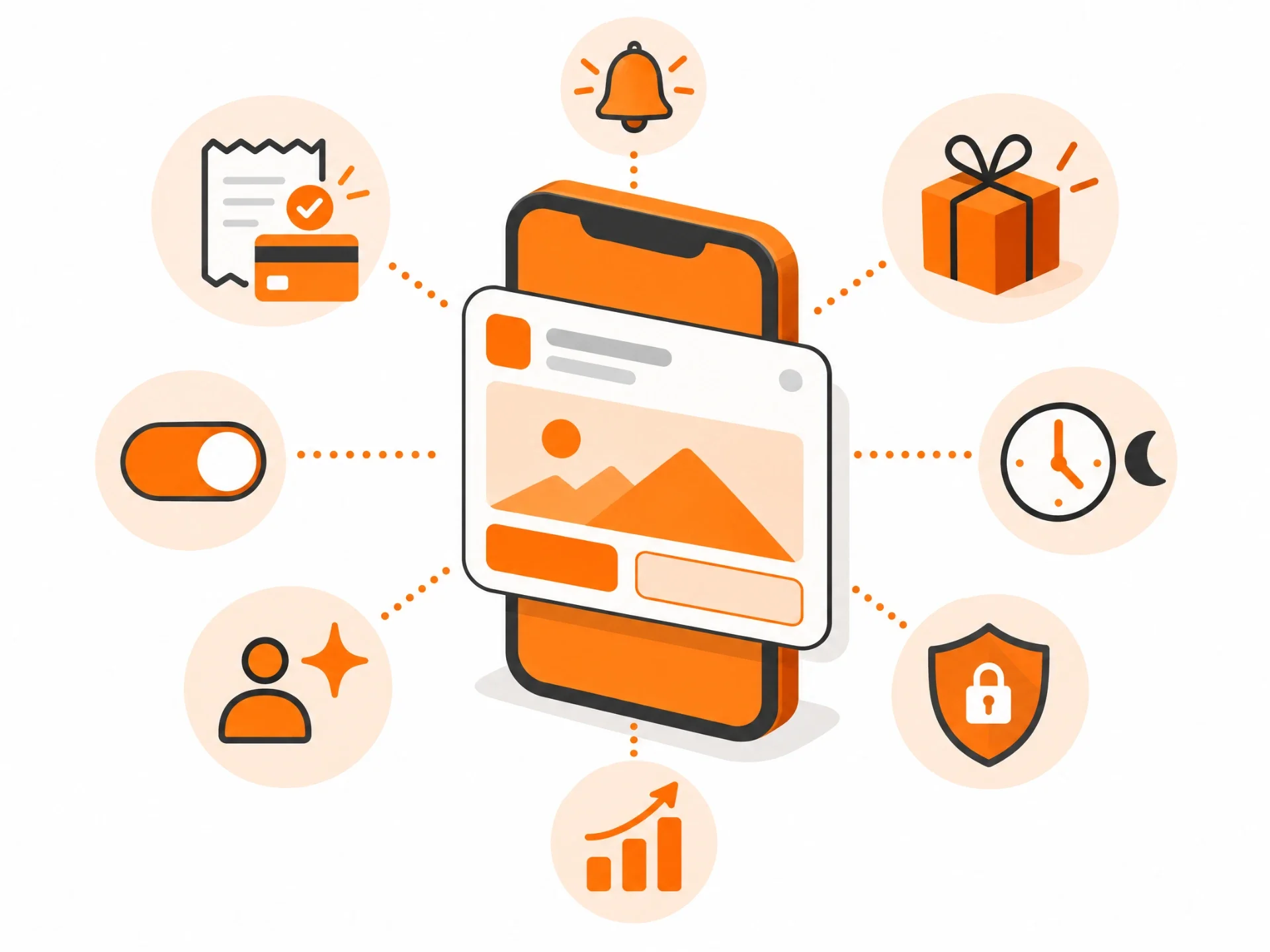
1. Ask for permission at the right moment
Do not ask on first launch before the user has seen any value. Ask when the benefit is obvious, for example after they place an order ("Want delivery updates?") or follow a topic. A short explanation screen before the system prompt (a "pre-permission" prompt) improves opt-in because the user knows what they are agreeing to.
2. Personalize
Use the user's name, location, preferences and history where it adds value. "Your size 9 runners are back in stock" beats "New arrivals are here!" every time.
3. Stay relevant
Send messages based on what each user has done and asked for, not one broadcast to everyone. Segment by behaviour, lifecycle stage and interests.
4. Get the timing right
Send in the user's local time zone and during sensible hours. Canada alone spans six time zones, so a 9 a.m. Toronto blast lands at 6 a.m. in Vancouver. Many platforms can learn each user's most active time and send then.
5. Control frequency
Set frequency caps, especially for promotional messages. If users mute or uninstall after a campaign, the frequency was too high. Let users choose how often they hear from you.
6. Be clear and concise
One message, one idea, one action. Put the important words first, avoid clickbait, and make sure the tap opens exactly the screen the message promised.
7. Use rich media with purpose
An image of the product, a map or a preview can lift engagement, but only when it adds information. Check how media renders on both iOS and Android, in light and dark modes.
8. Always deliver value
Before sending, ask: would the user be glad they received this? If the honest answer is "probably not", do not send it.
9. A/B test
Test copy, timing, media and calls to action with small groups before sending to everyone. Judge winners on downstream results (purchases, completed actions, retention), not just taps.
10. Respect privacy on the lock screen
Lock screens are visible to anyone nearby. Never put sensitive details such as health information, account balances or one-time codes in full in notification text unless the user chose that. Say "You have a new secure message" and show the detail after sign-in.
Advanced Targeting and Personalization
- Behaviour-based targeting: segment users by what they do, such as features used, items viewed, purchases or days since last visit.
- Location-based targeting: use city or region for timing and relevance, or geofences for in-store or venue messages, with clear location consent.
- Contextual targeting: consider device, time of day, weather, app version or whether the user is currently active in the app.
- Dynamic content: insert live values such as names, prices, delivery times or account details into one template.
- Behavioural triggers: automate messages when a user completes or abandons a step, or reaches a milestone.
- Predictive analytics: use machine learning to predict who is likely to churn, convert or engage, and the best time to reach each person.
How to Measure Push Notification Performance
Key metrics
| Metric | What it tells you |
|---|---|
| Opt-in rate | Share of users who allowed notifications. Low numbers point to poor permission timing or unclear value. |
| Delivery rate | Share of sent messages that reached devices. Drops often mean stale tokens or technical issues. |
| Open / tap-through rate | Share of delivered notifications that were tapped. Measures message relevance and copy. |
| Conversion rate | Share of users who completed the target action (purchase, booking, task) after the push. |
| Opt-out and mute rate | How many users turned notifications off after a send. The clearest warning sign of over-messaging. |
| Uninstall rate | Uninstalls after campaigns, a lagging but serious signal. |
| Retention impact | Do users who receive notifications stay longer than a control group who do not? |
Data analysis
Look at results by segment, platform, message type and send time, not only as one average. Compare against a holdout group that does not receive the message, so you know whether the notification caused the result or the user would have come back anyway.
Iterative improvement
Treat notifications as a product feature that improves over time: review results monthly, retire messages that drive opt-outs, refine segments, and keep testing timing and copy.
Challenges of Push Notifications
Privacy and consent
Users must opt in, and they can opt out any time. Data used for targeting, such as location and behaviour, must be collected with proper consent and protected. In Canada, personal information handled by businesses falls under PIPEDA, Quebec has additional requirements under Law 25, and promotional electronic messages may fall under Canada's Anti-Spam Legislation (CASL). The safe approach is to collect clear consent, explain what users will receive, and make opting out easy. Confirm the details for your app with legal counsel.
Customer experience and notification fatigue
Too many messages, irrelevant offers or alerts at 3 a.m. lead to muting and uninstalls. Operating systems now group, summarize and filter notifications (for example iOS Focus modes and notification summaries), so low-value messages are increasingly hidden.
Technical limitations
- Platform differences: iOS, Android and each browser display notifications differently, so test everywhere.
- Delivery is not guaranteed: devices may be offline, in battery saver mode, or have notifications blocked. Some Android manufacturers aggressively restrict background apps.
- Token management: tokens change and expire, and stale tokens must be cleaned up to keep delivery accurate.
- Payload size: messages are small, so long content belongs in the app, not the notification.
- Opt-in: Android 13 and later and all iOS versions require permission, so you cannot reach users who say no.
The Future of Push Notifications
Trends to watch
- AI-written and AI-timed messages: models that personalize copy and pick send times for each user.
- Smarter operating systems: on-device AI summarizing and prioritizing notifications, which rewards genuinely useful messages.
- Live, updating notifications: delivery tracking, sports scores and ride progress that update in place rather than sending new alerts.
- Web push on mobile: now that iPhone supports web push for Home Screen web apps, more businesses can reach mobile users without a native app.
- Cross-channel orchestration: push, email, SMS and in-app messages coordinated so users get one message on the best channel instead of the same message everywhere.
Ethical considerations
As targeting gets more powerful, the line between helpful and manipulative matters more. Avoid fake urgency, dark patterns that make opting out hard, and messages designed to exploit compulsive behaviour. Respectful notifications build trust that lasts longer than any single campaign.
What we expect next
Expect fewer, better notifications. Users and operating systems are both getting better at filtering noise, so the winning apps will be the ones that send messages people would have asked for anyway.
Push Notifications vs SMS, In-App Messages and Email
| Channel | Where it appears | Needs | Best for |
|---|---|---|---|
| Push notification | Device lock screen and notification centre, outside the app | App or web push opt-in | Timely updates and re-engagement |
| In-app message | Inside the app while the user is using it | User must be in the app | Onboarding tips, feature announcements, surveys |
| SMS | Phone messaging app | Phone number and consent; cost per message | Critical alerts, users without the app |
| Inbox | Email address and consent | Longer content, receipts, newsletters |
How App-Scoop Builds Push Notifications Into Your App
At App-Scoop, notifications are planned as part of the product, not added at the end. When we build an app we work out which events deserve a notification, how each one should read on the lock screen, how users control categories, and how results will be measured. That covers:
- APNs and FCM setup, web push where it makes sense, and clean token management.
- Notification categories and channels that separate transactional alerts from marketing messages.
- Permission flows that ask at the right moment and explain the value first.
- Privacy-safe notification text for health, finance and other sensitive apps.
- Analytics and A/B testing so you can see which messages drive retention and revenue.
Our team has built mobile and web products for healthcare, industrial and consumer clients, including projects such as Cambian Connect. Explore our mobile app development services, iOS app development and Android app development, or contact us to plan the notification strategy for your app.
Frequently Asked Questions
What is a push notification in simple words?
It is a short message from an app or website that pops up on your phone, computer or watch, even when the app is closed. Tapping it opens the app on the related screen.
How do push notifications work?
When you allow notifications, the app registers with a push service (APNs on Apple devices, FCM on Android, or the browser's service on the web) and gets a unique device token. When the business wants to reach you, its server sends the message with that token to the push service, which delivers it to your device.
What is the difference between a push notification and a notification?
"Notification" is the general term for any alert your device shows, including ones created locally by the device or app (such as an alarm or a reminder you set). A push notification is one sent from a remote server over the internet.
What is the difference between push notifications and SMS?
SMS is a text message sent to your phone number through your mobile carrier and usually costs the sender per message. A push notification is sent through an app or browser over the internet, requires that app or site plus your permission, and costs very little to send. SMS reaches anyone with a phone number; push reaches only users who installed the app and opted in.
What is the difference between push notifications and in-app messages?
Push notifications reach you outside the app, even when it is closed. In-app messages only appear while you are actively using the app, such as a welcome tour or a feature announcement.
What are the main types of push notifications?
Transactional (order, account and security updates), promotional (offers and campaigns) and event-triggered (based on your behaviour, such as an abandoned cart). Other common types include reminders, location-based, rich media, live updating and silent background notifications.
How do I turn on push notifications?
iPhone/iPad: Settings > Notifications > choose the app > turn on Allow Notifications.
Android: Settings > Apps (or Notifications) > choose the app > Notifications > turn on. Menu names vary by manufacturer.
Chrome on desktop: Settings > Privacy and security > Site settings > Notifications, then allow the site. You can also click the icon next to the web address.
Are push notifications secure and reliable?
Messages travel over encrypted connections between the provider, the platform push service and your device, and web push payloads are encrypted end to end. Delivery is very reliable but not guaranteed: if a device is offline, in a power-saving mode or has notifications blocked, a message may arrive late or not at all. Sensitive details should not be shown in full on the lock screen.
What makes a push notification strategy effective?
Ask for permission when the value is clear, personalize and segment, send at the right local time, cap frequency, keep each message to one clear action, separate transactional from promotional categories, and test and measure the results.
How do I track the effectiveness of push notifications?
Track opt-in rate, delivery rate, open or tap-through rate, conversion rate, opt-out and mute rate, and retention compared with a control group. Most push providers and analytics tools report these by message, segment and platform.
Can push notifications drive traffic to my website?
Yes. Web push notifications can bring subscribers back to new articles, products or offers, and app notifications can deep-link to web pages. Make sure each notification links to the exact page it describes.
What is the difference between web push and mobile push notifications?
Mobile push comes from an installed app through APNs or FCM and supports richer features. Web push comes from a website through the browser and does not need an app; on iPhone and iPad the site must first be added to the Home Screen.
Do I need permission to send push notifications?
Yes. iOS has always required users to opt in, Android requires it from Android 13 onward, and browsers require permission for web push. For promotional messages in Canada, follow consent rules and make it easy to opt out.
How many push notifications should an app send?
There is no single right number. Transactional alerts should go out whenever they matter; promotional messages should be limited and tested. If opt-outs or uninstalls rise after a send, you are sending too many.
Have a project in mind?
Let's talk about how we can build it. Free consultation, no obligation.
Get a Free Consultation