
My MVP Was Built with AI Tools — Do I Need to Start Over?
You built it in a weekend, maybe two. Lovable, Bolt, Cursor, Replit, or some mix of them. It looked great in the demo, a few early users signed up, and then the cracks started. A login that fails for some people. A page that crawls once there are a few hundred records. A change you asked the AI to make that quietly broke three other things. Now you're wondering whether the honest answer is to throw it all away and start over.
The short version: usually not. But “usually” hides real nuance, and we have a stake in this question, so we'll try to be extra straight about it.
TL;DR
- Most AI-built MVPs don't need a clean-slate rebuild. They need stabilizing: a real backend, proper security, tests and monitoring around a front end that already works.
- A full rebuild is justified when the data model doesn't match your business, nobody can explain how the code works, or the structure is too tangled to change safely. Even then, your existing app is the best specification you'll ever have.
- Prompting the AI to fix structural problems usually makes things worse. The fix-one-thing-break-three loop is a known limitation of the tools, not a skill issue.
- The only honest way to know which path you're on is to have someone read the code. Be wary of anyone quoting a price sight unseen.
The Short Answer
Usually no, you don't need to start over. What you need is to find out what's underneath the interface. The screens, the flows and the product decisions you've validated with real users are the valuable part, and they mostly survive. What tends not to survive contact with real customers is the layer beneath: authentication, database design, security, error handling, and the absence of tests.
Here's the honest conflict of interest. App-Scoop does this work. Stabilizing AI-built apps is one of the ways projects come to us, so we earn money whichever way you go. In most cases, though, we'd rather stabilize than rebuild, because it's faster, cheaper for you, and keeps what you've already learned. A rebuild is sometimes right. It isn't the default.
Why AI-Built MVPs Hit a Wall
AI tools are very good at the first stretch. They're much weaker at the structure that holds a product together over time. They work within a limited window of context, can lose track of decisions made earlier, and tend to patch the symptom in front of them rather than the cause underneath. Early on that's invisible. As the codebase grows, each new prompt is more likely to disturb something that was working. That's the fix-one-thing, break-another loop so many founders describe.
The research points the same way. Veracode's 2025 testing found 45% of AI-generated code samples introduced security vulnerabilities. CodeRabbit's analysis of real pull requests found AI-co-authored code carried roughly 1.7 times more issues than human-written code. And Addy Osmani's “70% problem” captures the pattern: AI produces most of the obvious code quickly, but the remaining stretch—edge cases, real integrations, security and debugging—is as slow as ever.
In fairness, technical debt isn't unique to AI. Hand-written codebases accumulate it too. What's different with a vibe-coded app is where it shows up, and the fact that the person who owns the product often can't read the code to see it. That's why “does it work?” stops being a useful question after a while, and “who understands it?” becomes the real one.
Signs You've Hit the Wall
- Each fix breaks something else, and you're burning credits going in circles.
- The app works for you but not for other people: logins fail with several users, or data appears in the wrong account.
- Pages and queries slow down badly once you have a few hundred records.
- Payments work in test mode and fail in production.
- API keys or secrets are sitting in front-end code or a public repository.
- There are no automated tests, so nobody can change anything with confidence.
- Nobody—you, a freelancer, or the AI—can explain how a core part of the app actually works.
- A customer or investor asked a security question you couldn't answer.
If three or more of those sound familiar, don't panic. It's a normal stage, not a verdict on your product.

Stabilize, Refactor or Rebuild: The Three Paths
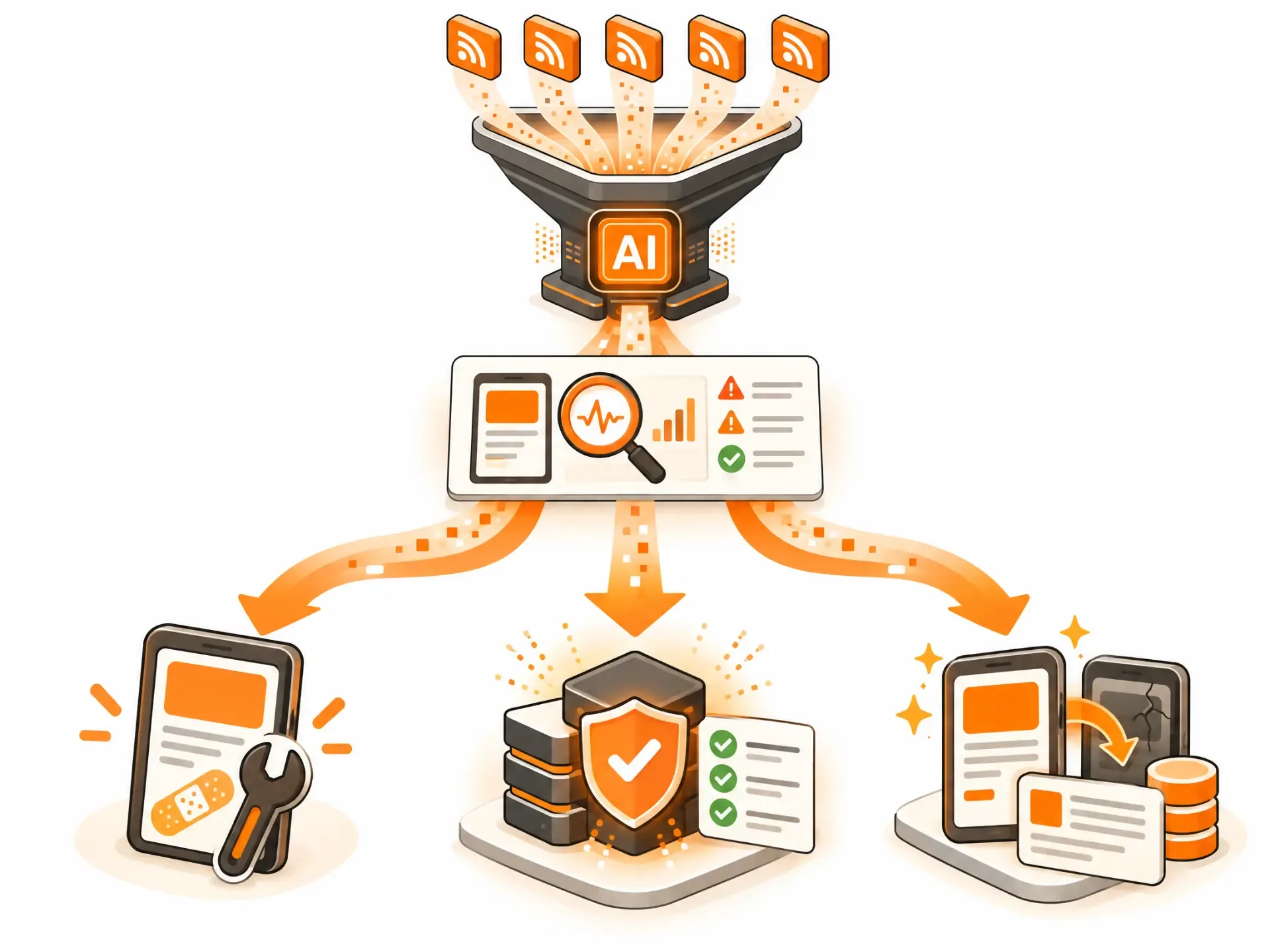
Think of it as three levels of intervention. Which one you need is a diagnosis the code determines, not a menu you pick from.
| Path | What It Is | It Fits When | Relative Effort |
|---|---|---|---|
| Emergency patch | A targeted fix for one specific, urgent failure: site down, payments failing, or a security hole | Something specific broke and users or revenue are at risk | Hours to days. It stops the bleeding but doesn't make the codebase healthy. |
| Structural stabilization | Keep what works—usually the front end and validated flows—and rebuild or harden what doesn't: backend, authentication, database, security and tests | The product has real value but the foundation can't support real traffic, many users or compliance | Weeks. This is where most AI-built MVPs land. |
| Full rebuild | Re-implement from scratch on a production-grade foundation, using your current app as the specification | The structure is too tangled to change safely, or the data model blocks what you've already sold | Months. The biggest bet, and the one most often over-prescribed. |
No one has published a reliable breakdown of how many AI-built apps fall into each path, and anyone who quotes you one is guessing. Practitioners tend to report that stabilization is the most common outcome, rebuilds the next most common, and pure emergency patches the least, but treat that as experience rather than data.
What Usually Survives, and What Usually Gets Replaced
| Usually Survives | Usually Rebuilt or Hardened |
|---|---|
| Interface components, styling and design | Authentication and authorization |
| Validated user flows and product decisions | Database schema: structure, indexes and constraints |
| Your data, migrated carefully | Security layer: secrets, access rules and input validation |
| Brand, copy and content | Error handling and logging |
| Outside services you've chosen, such as payments and email | Automated tests |
| The knowledge of what your users actually want | Deployment, environments, backups and monitoring |
That split is why stabilization usually costs less than a rebuild. The part users see and have validated stays. The part nobody saw gets professional attention.
When a Rebuild Really Is the Right Call—and When It's a Trap
A rebuild makes sense when:
- The data model doesn't match how your business actually works, and fixing it means rewriting most of the app anyway.
- There's no coherent structure or clear boundaries between parts, so every change is risky.
- Authentication was bolted on and can't support the roles, teams or permissions you now need.
- Tests can't be added without restructuring everything first.
- Several experienced engineers have looked at it and independently said, “I'd start again.”
If that's you, a rebuild isn't a failure. Your working prototype is the best specification you could have written: every screen, flow and edge case your early users found is already captured in it, which makes the rebuild far faster than starting from a blank page.
But rebuilds have their own trap. The classic warning against rewriting software from scratch still holds: rewrites run long, and they throw away lessons buried in the old code. A safer pattern replaces pieces one at a time while the app keeps running. And remember that a rebuild doesn't automatically deliver the layers that were never built. Security, monitoring and tests start at zero in the new codebase too, unless someone does that work on purpose.
What to Do This Week, Before You Spend Another Credit
- Pause new features. Every feature added to a shaky foundation increases the cost of fixing it.
- Stop asking the AI to fix structural problems. Small interface tweaks are fine. Authentication, database and security changes are where it tends to do damage.
- Export and back up everything. Get the code into a repository you control and take a database backup before anyone touches anything.
- Run a quick security check. Look for secrets in front-end code, database tables readable by the public or missing access rules, exposed environment files, and debug mode left on in production.
- Write down your real user flows. Sign-up, login, payment, and the core thing your product does. These become the tests that make safe changes possible.
- Get a second opinion from someone who reads code. An outside review is usually faster and more objective than another round of prompting.
What a Professional Assessment Actually Looks Like
A proper assessment answers three questions in plain language: what's sound, what isn't, and what it takes to fix each part, with a recommendation per component rather than a blanket “rebuild.” You should end up with a prioritized list—security issues first—a clear view of what's salvageable, and a plan with realistic ranges before anyone writes new code.
That's how we handle it. AI-built app stabilization is one of the ways projects come to us, alongside building from scratch and taking over from another agency or freelancer. It starts the way everything does: a Blueprint that documents what's there and what it should do, then fixes and hardening against that. The goal isn't to criticize the tool that built your MVP. It's to get you to something stable, documented and ready for real customers—which is what we mean by production-ready. You can see how that fits into our wider SaaS development approach.
When You Shouldn't Pay Anyone to Fix It
- It's a pre-launch demo. If you built it to test an idea, keep it light: validate first, and expect to rebuild if the idea works. That's what vibe coding is genuinely good for, and the balance we described in Vibe Coding vs. Professional App Development.
- A simpler tool would do the job. If an off-the-shelf product or a no-code setup solves the problem, use it. We'll tell you if that's the case.
- You have no users yet. If the idea is unproven, spend on finding customers, not on hardening code you may throw away.
Frequently Asked Questions
Do I need to rebuild my AI-built MVP from scratch?
Usually not. Most AI-built MVPs need stabilizing—a real backend, security, tests and monitoring—rather than a clean-slate rebuild. A rebuild is warranted when the data model blocks what you've already sold, the structure is too tangled to change safely, or nobody can explain how the code works.
How much does it cost to fix an AI-built MVP?
There's no honest single number. Costs run from a few hours of work for a targeted fix to a project measured in months for a rebuild, and the only way to know where you fall is to have someone review the code. Be cautious about anyone quoting a fixed price sight unseen; they're either padding it or planning change orders. For broader cost context, see our Application Development Cost guide.
Can I keep using Lovable, Bolt or Cursor to fix it?
For small, contained changes—copy, styling or a simple new screen—often yes. For structural problems like authentication, the database and security, repeated prompting tends to cause more damage than it fixes. Treat the AI as an assistant working under a developer's direction, not as the one making architectural decisions.
Is my AI-built app secure?
Don't assume it is. Studies and audits repeatedly find security gaps in AI-generated code, including exposed keys, missing access rules and weak authentication. A quick self-check helps, but if you handle customer data or payments, get an independent review.
Should I have vibe-coded my MVP in the first place?
If the goal was testing an idea quickly and cheaply, yes—that's what it's good for. The mistake isn't using AI to move fast. It's assuming the prototype can serve as the long-term product without being hardened.
How long does stabilization take?
From days for a contained set of fixes to several weeks for structural work, depending on what an assessment finds. Full rebuilds take months.
Will investors or customers care that my MVP was built with AI?
Usually they care about security, scalability, code ownership and whether the team understands the system, not which tool typed the code. A stable, documented codebase you can explain is what reassures them.
Do I keep my data and users if the code is rebuilt or rewritten?
Yes. Data migration is a normal part of both paths and is handled carefully so users don't lose accounts or history. It's one more reason to back everything up before anyone starts.
Does waiting make it more expensive to fix?
Generally yes: every new feature built on a weak foundation is another thing to untangle later. That's why pausing feature work while you get an assessment is usually the cheapest move you can make.
Not Sure Which Path You're On?
Send us what you've built and we'll tell you plainly whether it needs a patch, stabilization or a rebuild. If the honest answer is “leave it alone,” we'll say that too. Get in touch. If you're also weighing where to build, our guide to SaaS Product Design and Development in Canada covers costs, tax credits and how to choose a partner, while our Application Development Cost guide covers the wider budget picture.
Have a project in mind?
Let's talk about how we can build it. Free consultation, no obligation.
Get a Free Consultation