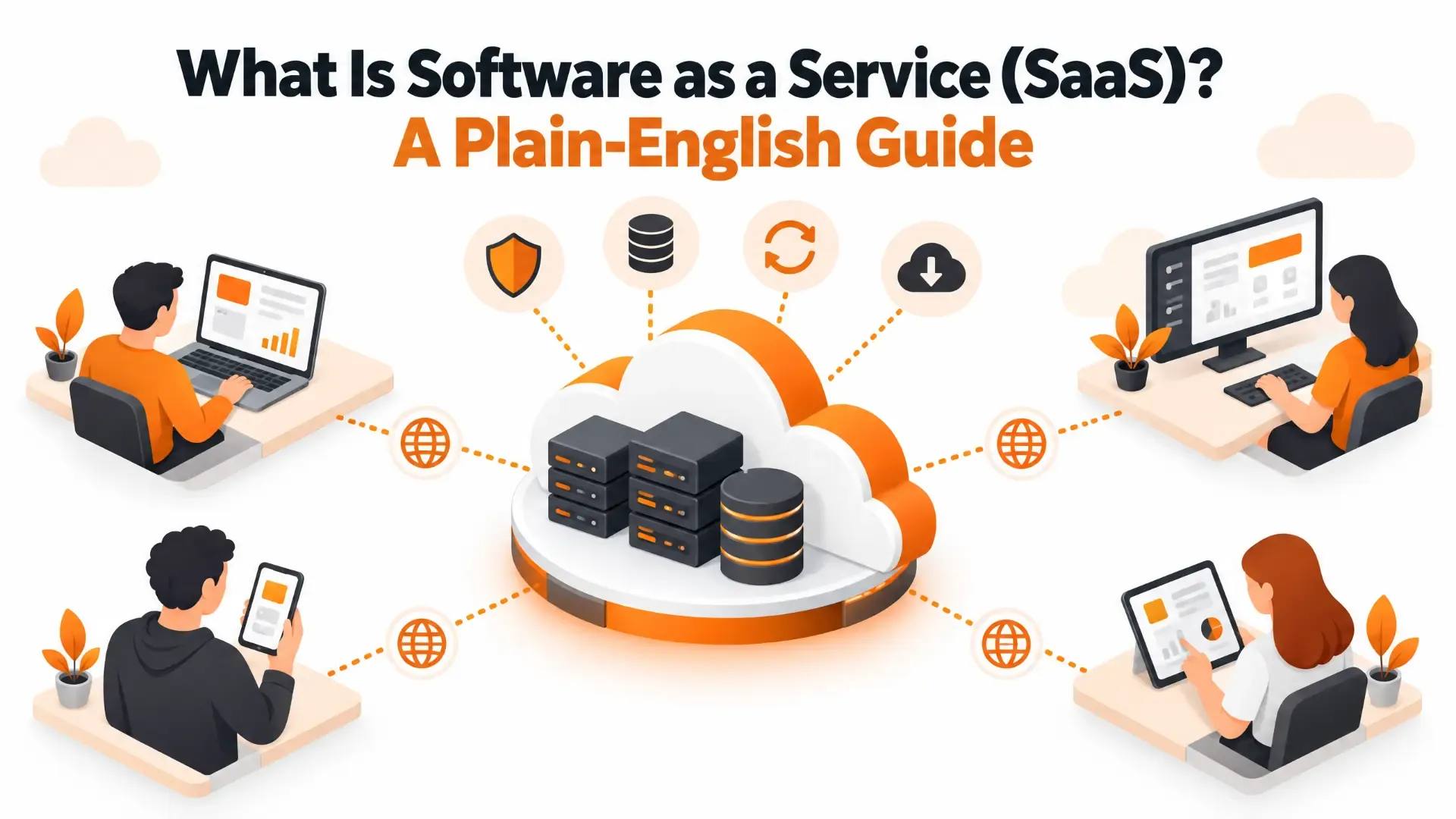
What Is Software as a Service (SaaS)? A Plain-English Guide
Open your email. Join a video call. Look up a customer in your CRM. Pay an invoice. Chances are none of that software lives on your computer. You logged in, it ran on someone else's servers, and next month you'll pay for it again. That's software as a service, and it has quietly become the default way most of us use business software.
This guide explains what SaaS is, how it works, how it differs from IaaS, PaaS and model as a service, what it costs, where it goes wrong and where it's heading. We've also answered the questions people actually type into Google, including whether ChatGPT, Netflix and YouTube count as SaaS.
Key Takeaways
- SaaS is software you rent and use over the internet. The provider hosts, secures, maintains and updates it, and you pay a subscription instead of buying and installing anything.
- One shared platform serves many customers (multi-tenancy), with each customer's data kept separate. That sharing is what keeps SaaS affordable.
- The big gains are a fast start, no infrastructure to run, automatic updates and easy scaling. The trade-offs are less control, dependence on the vendor, and "sprawl" if nobody keeps track of the apps your team adopts.
- Whether something counts as SaaS depends on what you're paying for: software that does a job for you (SaaS), or something else, like entertainment content or raw AI models.
- AI features, industry-specific (vertical) products, low-code tools and zero-trust security are shaping where SaaS goes next.
What Is SaaS? (Software as a Service Definition)
Software as a service (SaaS) is a way of delivering software in which a provider hosts the application in the cloud and customers use it over the internet, usually through a web browser or a mobile app, for a recurring fee. You don't buy the software outright, you don't install it on your own servers and you don't patch it. The provider runs everything behind the scenes: the servers, the database, the security, the backups and the updates. You create an account, pay and log in.
A fair comparison is renting a furnished apartment versus buying a house. In the apartment, somebody else fixes the boiler and you can walk away when the lease ends. In the house, you own everything, including every repair bill.
The idea is older than the name. In the 1950s, applications ran on central mainframes and were reached from remote terminals, which looks a lot like today's model. SaaS as we know it began around 1999, when Salesforce launched its customer relationship management (CRM) system as software delivered through a web browser. Since then it has become the dominant way software is sold.
IBM, citing BetterCloud's State of SaaS 2025 report, notes that large enterprises (more than 5,000 employees) used an average of 131 SaaS applications in 2024. It also cites Grand View Research, which put the global SaaS market at roughly USD 399 billion in 2024 and expects it to reach about USD 819 billion by 2030. Research firms estimate these things differently, so treat the figures as a sense of scale rather than exact facts.
How Does SaaS Work?
From the customer's side it's simple. Behind the scenes, this is what happens:
- The vendor builds and hosts the application. It runs on the vendor's own cloud infrastructure or on a public cloud such as AWS, Microsoft Azure or Google Cloud.
- You subscribe and log in. You sign up for a plan and open the app in a browser, or on a phone or tablet.
- The work happens on the vendor's servers. Your actions are sent over the internet, processed there, and your data is stored there.
- The vendor keeps it running. Updates, security patches, backups and scaling are handled for you, often several times a week and often without you noticing.
- Billing renews. You keep paying as long as you keep using it, and you can usually change plans or cancel when your needs change.
What every SaaS application has in common:
- Built for the cloud. It's designed to be hosted online, which is what makes scaling and global access practical.
- Reachable from any connected device. Most run in any modern browser, and many offer mobile apps or a lightweight desktop client.
- Multi-tenant. One running copy of the software serves many customers at once.
- Little or no maintenance for you. The vendor provisions the servers, applies the upgrades and plans for outages and disaster recovery.
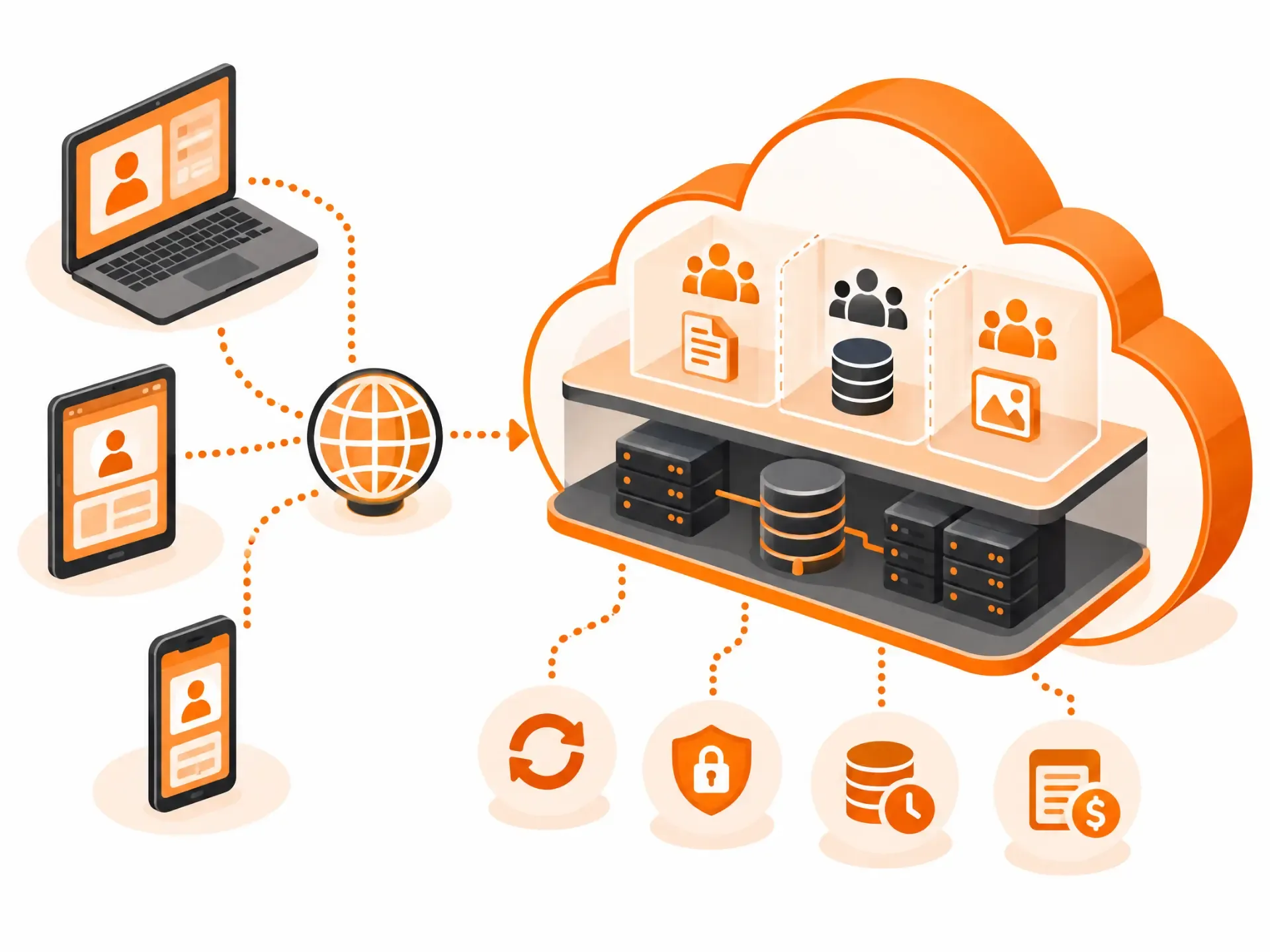
In a multi-tenant system, a single instance of the application, along with its underlying database and hardware, serves many customers (called tenants). Each tenant's data, users and settings are kept logically separate from everyone else's, much as tenants in an apartment building share the plumbing and the roof but each have their own locked door. Because the infrastructure and maintenance costs are spread across everyone, each customer pays far less than they would to run the same software alone.
APIs and Integrations
Most serious SaaS products expose APIs (application programming interfaces) so they can talk to other software. That's how your CRM can pull in invoices from your accounting tool, or your project tool can post updates into chat. If you're connecting SaaS tools to each other or to your own systems, our API & System Integration work covers exactly that.
SaaS vs. Cloud Computing: What's the Difference?
Cloud computing is the broad idea of getting computing resources over the internet on demand: servers, storage, databases, networking, development tools, software and AI services. SaaS is one specific way of using it, the software layer. Think of cloud computing as the electrical grid and SaaS as one appliance plugged into it.
Two practical points follow. First, SaaS can't exist without cloud infrastructure underneath it, which is why every SaaS vendor depends on one. Second, you can use SaaS without ever touching the other cloud services. Plenty of small businesses run on Google Workspace and Slack and have never rented a server in their lives.
IaaS vs. PaaS vs. SaaS
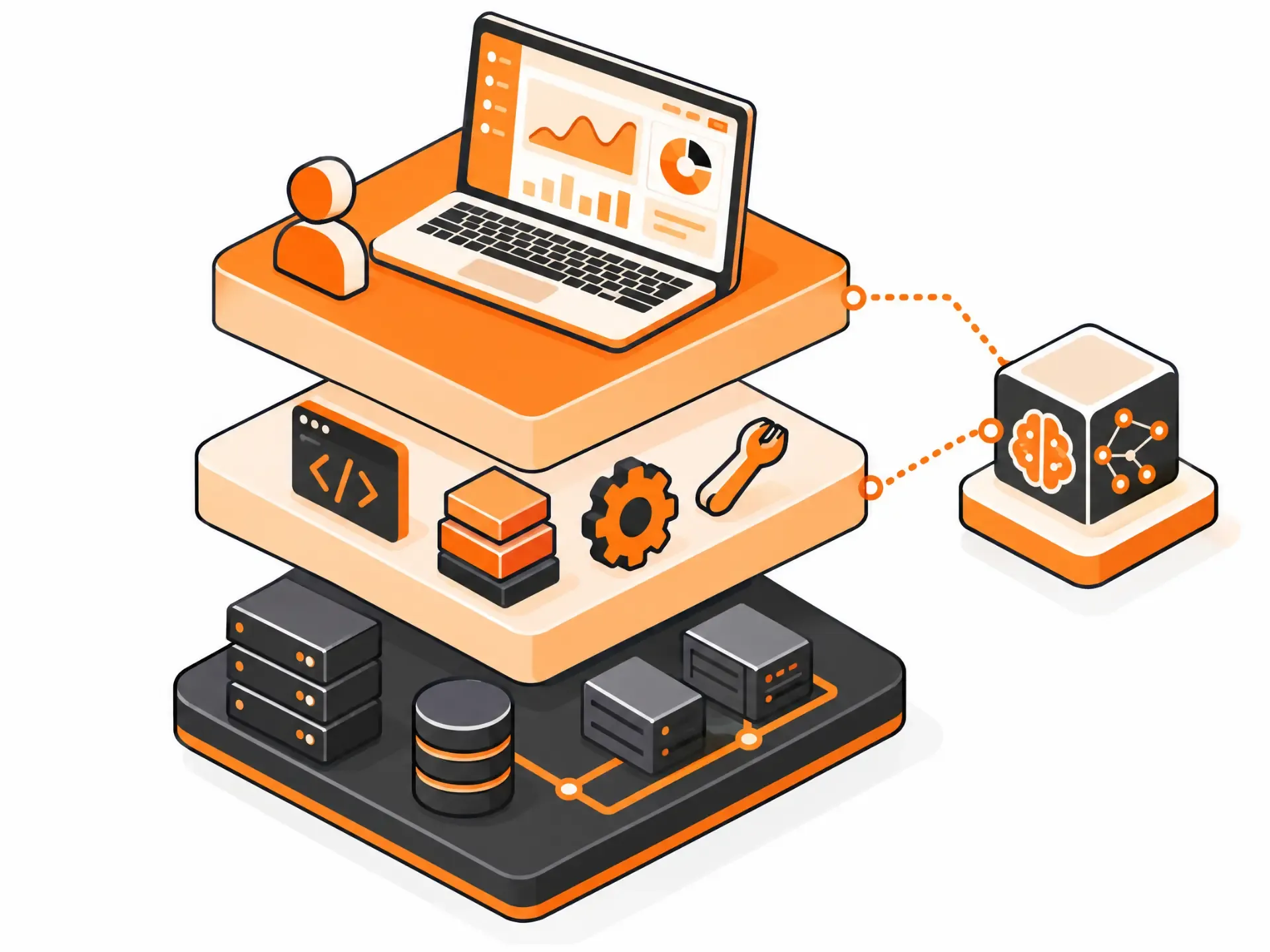
These are three layers of the same stack. The higher you go, the less you manage and the less you can customize. A quick example with email: on IaaS you'd rent servers and install and run a mail system yourself. On PaaS you'd build your own mail app on a managed platform. With SaaS you'd just use Gmail.
| Model | What you get | Who manages what | Typical user | Examples |
|---|---|---|---|---|
| IaaS | Raw computing: servers, storage, networking | Provider runs the hardware. You manage the operating system, middleware, apps and data. | IT and DevOps teams | AWS EC2, Azure Virtual Machines, Google Compute Engine |
| PaaS | A platform to build, run and manage your own apps | Provider runs infrastructure, OS and runtime. You manage your app and data. | Software developers | Heroku, Google App Engine, Azure App Service |
| SaaS | A finished, ready-to-use application | Provider runs everything. You manage your users, settings and the data you put in. | Anyone in the business | Salesforce, Slack, Google Workspace, Microsoft 365 |
IaaS (Infrastructure as a Service)
IaaS rents you the building blocks of a data center without the data center. It gives you the most control and the most responsibility. It suits teams with strong IT skills, unpredictable workloads or startups growing fast who don't want to buy hardware, and the usual pricing is pay-as-you-go.
PaaS (Platform as a Service)
PaaS sits in the middle. The provider manages the servers, operating system and runtime so developers can focus on writing and deploying code. It's efficient for building custom software, though you give up some control over the environment, and you remain responsible for the application and its data.
SaaS (Software as a Service)
With SaaS the provider handles everything from the code to the servers. You can configure settings and manage permissions, but that's about it. It's the best fit when you want proven software that works with minimal effort. The trade-off is that you have little control over features, data handling and customization, and you never own the software itself.
Comparing SaaS, PaaS and MaaS: SaaS vs. Model as a Service
Model as a service (MaaS) is the newest member of the family. Instead of delivering an application, it delivers pre-trained machine learning and AI models through an API. A developer can plug in speech recognition, sentiment analysis, image understanding or anomaly detection without training a model from scratch. SaaS and PaaS serve a wide range of uses, while MaaS is specifically about AI.
They also work together. A SaaS product can use MaaS under the hood to power recommendations, chatbots or fraud detection, and because the model provider keeps improving the model, the SaaS product inherits those improvements. This distinction matters for one of the most common questions below: is ChatGPT SaaS?
Examples of SaaS
SaaS now covers nearly every business function. Some familiar names by category:
- Communication and collaboration: Slack, Microsoft Teams, Zoom.
- Productivity and office tools: Google Workspace, Microsoft 365.
- Sales and customer management: Salesforce, HubSpot.
- File storage and sharing: Dropbox, Box.
- Design: Figma, Canva.
- Online stores and marketing: Shopify, Mailchimp.
Benefits of SaaS (Advantages of SaaS)
The advantages are clearest when you compare SaaS with traditional software, which you buy, install on your own machines and maintain yourself.
Faster adoption and time-to-benefit. You can sign up and start working in minutes, often for little more than the first month's subscription. Traditional software can mean buying servers, installing it on every device and paying for a full licence per user before anyone sees any value.
Access to advanced applications. Tools that once only large companies could afford, such as ERP and CRM systems, are now within reach of small teams with limited IT resources, because the provider carries the hardware, middleware and maintenance.
Pay only for what you use. Many SaaS plans scale with use, so you aren't paying for capacity that sits idle in quiet months. (Not every plan works this way. Some are flat-rate, as covered under pricing below.)
No need for local installation. Most SaaS runs in a web browser, so there's nothing to download, install or update on each device. Some apps do ask for a plugin or a small desktop or mobile app.
Access to new features as soon as they're available. SaaS vendors ship improvements continuously. With on-premise software, upgrades are costly and disruptive enough that customers often wait months or skip versions.
Cost-effective, on-demand scalability. Need more users, storage or features? Move up a plan. Traditional software makes you buy capacity ahead of time in case you need it.
Predictable costs and lower overhead. There's no infrastructure to budget for, no upgrade project and no in-house team needed just to keep the software running. Most of what you spend goes straight into using the software.
Support for a mobile workforce. Staff can work from any internet-connected laptop, phone or tablet, and the provider takes care of device compatibility and baseline security.
Access app data from anywhere. Because the data lives in the cloud rather than on one machine, a broken or lost laptop doesn't mean lost work.
Potential Challenges of SaaS
SaaS isn't free of risk, particularly for larger organizations. None of these are reasons to avoid it. They're reasons to manage it.
SaaS sprawl. Because SaaS is so easy to adopt, teams sign up for tools on their own, and the number of apps quietly balloons. Left unchecked, that wastes money, duplicates functions and scatters data across tools that don't talk to each other.
Shadow IT. When employees use apps the IT department doesn't know about, nobody can verify those tools are secure. Reused passwords and unmanaged accounts are common side effects, and each one raises the organization's exposure.
Less control over your data. With SaaS you hand data storage and management to a third party. You can still set permissions and, in most products, export your data, but you can't tailor how it's stored or secured the way you could on infrastructure you run yourself.
Vendor lock-in. If a vendor stops meeting your needs, you can't move the application elsewhere. You have to find a replacement product and migrate to it, which can be hard when your data and workflows are deeply tied to the old one.
Limited customization and integration. SaaS products are built for many customers at once, so you get what the vendor offers. If you need behaviour the product doesn't support, you either work around it or look at custom software.
SaaS Pricing
Traditional software is usually sold as a perpetual licence: a large upfront payment, maybe a maintenance fee, and the software is yours to run. SaaS replaces ownership with access. You pay recurring fees for a subscription, and pricing is designed to flex as your needs change. The common models:
| Model | How it works | Good for | Watch out for |
|---|---|---|---|
| Flat-rate | One plan, one price, all features | Teams that want predictable costs | Can feel expensive for light users |
| Usage-based | You pay for what you consume, such as emails sent or records stored | Variable workloads; scales with you | Bills are harder to predict |
| Tiered | Plans by feature set, user count or usage limits | Most businesses; easy to move up as you grow | Key feature may sit in a higher tier |
| User-based (per seat) | Price rises with each person who needs access | Clear link between cost and value | Teams may share logins to avoid cost |
| Free or freemium | Free trial or a permanently free, limited version | Trying before you buy | Limits may push you to upgrade quickly |
Most vendors offer both monthly and annual billing, with a discount for paying yearly, and large customers usually get an "enterprise" tier with negotiated pricing, support terms and service-level agreements.
Common SaaS Scenarios (Use Cases)
SaaS shows up wherever a team needs shared, always-current software. Three of the most common areas:
Business management and operations. Project management, CRM, accounting and HR tools give every department real-time access to the same data, which speeds decisions and removes the spreadsheets-by-email routine.
Collaboration and communication. Messaging, video meetings, shared documents and file storage let people work together smoothly from any location. These tools made remote and hybrid work practical.
Data analytics and business intelligence. Cloud analytics tools process, visualize and report on data as it arrives, supporting trend analysis and forecasting without the company running its own analytics infrastructure.
Future Trends in Software as a Service
SaaS keeps changing as technology and customer expectations shift. These are the trends worth watching.
AI and machine learning. AI is moving from a bonus feature to a core part of SaaS: predictive analytics, natural-language interfaces, smart automation and AI-assisted security. If you're adding AI to an existing product, that's the territory of our ChatGPT & LLM Integration and AI Workflow Automation teams.
Zero-trust security and compliance. More vendors and customers are adopting a "never trust, always verify" approach, with continuous authentication, tighter identity and access management and automated compliance checks. Expect security evidence such as audit reports to be part of any serious buying decision.
Low-code and no-code platforms. Visual builders let non-developers assemble working applications, which takes pressure off IT teams. They're great for prototypes and internal tools, with limits as products get complex, a balance we explore in Vibe Coding vs. Professional App Development.
Beyond those three, five developments are changing the shape of the products themselves.
Mobile-First Development
More people do real work on phones and tablets, so SaaS products are increasingly designed for small screens first and desktop second. Our mobile app development team builds exactly this kind of companion experience.
Vertical SaaS
Rather than serving every industry with the same general tool, vertical SaaS is built for one: healthcare, construction, finance, logistics. It comes with the workflows and compliance features that industry needs out of the box. In regulated areas like health, the compliance side matters a great deal; see our healthcare app development guide for Toronto for one example.
Micro-SaaS
Micro-SaaS products are small, tightly focused tools, often built by tiny teams or a single founder, that solve one narrow problem, frequently as an add-on to a larger platform such as Shopify, Salesforce or Slack.
API Integrations
Customers expect SaaS tools to connect with one another. Better APIs and integration platforms mean data flows between products without anyone re-typing it.
Evolving Pricing Models
Pricing is shifting toward more flexible, value-based structures. AI features in particular, which cost real money every time they run, are pushing vendors toward usage-based and hybrid models.
Analysts expect continued strong growth, driven by the move away from on-premise software, AI features, industry-specific products and demand for scalable, cost-effective tools.
How to Choose a SaaS Product
If you're buying rather than building, a few checks will save you pain later:
- Security and compliance. Ask for evidence such as SOC 2 or ISO 27001 reports, and check for multi-factor authentication, single sign-on and audit logs.
- Integrations. Does it connect to the tools you already use, through ready-made integrations or a documented API?
- Your exit. Can you export your data in a usable format, and what happens to it if you cancel?
- Pricing at your size, and at twice your size. Per-seat and usage-based plans can look cheap today and expensive after a year of growth.
- Reliability and support. Look for an uptime commitment, a public status page and support hours that match your working day.
- Where your data lives. If you serve health, finance or public-sector customers, you may need a particular country or region.
- A real trial. Run a small group through a genuine workflow for a couple of weeks before committing the whole team.
Thinking About Building a SaaS Product Instead?
For most businesses, buying SaaS is smarter than building it. The exception is when the software itself is your product or your competitive edge. If that's you, the questions change: what to build first, what it costs, and what it takes to be ready for real customers. We've covered each in depth:
- SaaS product design and development in Canada: costs, timelines, SR&ED tax credits and how to choose a partner.
- What "production-ready" actually means for a SaaS product: the seven areas to check before launch.
- My MVP was built with AI tools: do I need to start over?: fix, refactor or rebuild.
If you'd like a straight read on your own idea, see how we approach production-ready SaaS development, or get in touch.
Frequently Asked Questions
What is SaaS in simple terms?
SaaS is software you use online instead of installing it yourself. A company hosts the program, keeps it secure and up to date, and you pay a subscription to log in from a browser or app. Gmail, Slack and Zoom are everyday examples.
What does SaaS stand for?
Software as a service. The "as a service" part means you consume the software as an ongoing service you subscribe to, rather than a product you buy once and own.
What is an example of SaaS?
Salesforce (CRM), Slack and Microsoft Teams (messaging), Zoom (video meetings), Google Workspace and Microsoft 365 (office tools), Dropbox (file storage), Shopify (online stores) and Figma (design) are all SaaS. In each case the provider runs the software and you rent access to it.
How can you identify a SaaS company?
Look for software that runs in a browser or app with nothing to install, sold by subscription, updated by the vendor without any effort on your side, and shared by many customers whose data is kept separate. Another giveaway is the vocabulary: SaaS companies talk about monthly or annual recurring revenue and churn rather than units sold.
Is ChatGPT a SaaS product?
Mostly yes, with a catch. The ChatGPT app you open in a browser or on your phone fits the SaaS definition: OpenAI hosts it, you reach it over the internet, and you pay by subscription, with free, individual and team or enterprise plans. But OpenAI also sells access to its models through an API so developers can build their own products, and that's closer to model as a service (or a platform) than to SaaS. So ChatGPT the app is SaaS, the API behind it isn't quite, and a product you build on top of that API can be SaaS in its own right. If you're building on it, that's what our ChatGPT & LLM Integration service is for.
Is Netflix a SaaS?
Strictly speaking, usually not, though people argue about it. Netflix has SaaS-like traits: it's hosted in the cloud, you pay a subscription and one service reaches millions of people at once. But what you're paying for is access to content, not software that does a job for you. Most definitions therefore classify Netflix as a streaming or consumer subscription service. Some sources, IBM among them, list streaming platforms alongside SaaS examples, so you will see both answers online. A handy test: is the thing you pay for a tool or a library? Netflix is a library. Netflix is also a big customer of cloud infrastructure (it's well known for running on AWS) rather than a SaaS product itself.
Is YouTube a SaaS?
Not in the usual sense. YouTube is mainly a free, ad-supported video platform where the product is content and audience, not software you subscribe to for a business task. It does have SaaS-like pieces: YouTube Premium is a subscription, YouTube Studio is a web tool creators use to manage their channels, and the YouTube API lets developers build on it. But as a whole it's best described as a media platform. (You'll occasionally see it labelled PaaS, which is also a stretch, since PaaS means a platform for building and running your own apps.)
What's the difference between SaaS, PaaS and IaaS?
They're layers of the same stack. IaaS rents you raw computing resources, PaaS rents you a platform to build and run your own applications, and SaaS gives you a finished application. The higher up you go, the less you manage and the less you can customize.
Is SaaS the same as cloud computing?
No. Cloud computing is the broad idea of using computing resources over the internet. SaaS is one specific way of delivering software on top of it. All SaaS runs on the cloud, but plenty of cloud use isn't SaaS.
Are Google Workspace and Microsoft 365 SaaS?
Yes. Both are subscription services that the provider hosts, updates and secures. Microsoft 365 also lets you install desktop apps, but the licensing, cloud storage and updates are delivered as a service.
Is SaaS paid monthly?
Often, but not always. Monthly plans are common, and many vendors also offer annual billing at a discount. Some charge by usage, and enterprise contracts are usually negotiated. Check whether a "monthly" price is actually billed annually and what the cancellation terms are.
What are the disadvantages of SaaS?
Less control and customization, dependence on the vendor and on an internet connection, potential vendor lock-in, security and compliance questions because your data sits with a third party, and subscription costs that never end. Larger organizations also face SaaS sprawl and shadow IT.
Is SaaS secure?
It can be very secure, often more than what a small company could build alone, but security is shared. The provider secures the infrastructure and the application. You're responsible for who has access, how accounts are configured and what data you put in. Turn on multi-factor authentication, use single sign-on where available and ask vendors for independent audit reports.
Who owns my data in a SaaS product?
Generally you keep ownership of the data you put in, while the vendor controls the platform it lives on. Terms vary, so check the contract for data export, deletion, retention and where the data is stored. The right to export your data in a usable form is your best protection against lock-in.
What is multi-tenancy in SaaS?
It's the design where a single running copy of the software serves many customers (tenants) at once, with each tenant's data kept logically separate. It's the reason SaaS can be priced affordably, and one of the key architecture decisions when building a SaaS product.
How do SaaS companies make money?
Mainly through recurring subscriptions: tiered plans, per-seat pricing or usage-based fees. Many add revenue from premium features, onboarding and implementation services, and add-on marketplaces. The key health metrics are recurring revenue, how many customers cancel (churn) and how much each customer spends over time.
Is SaaS a good business to start?
It can be. Recurring revenue, scalability and low distribution costs are real advantages. But it also takes serious upfront investment in development, security, marketing and customer support, and many SaaS products fail because they never found a problem worth paying for. Validating demand first, then building something production-ready, is what separates the ones that work.
How much does it cost to build a SaaS product?
It depends on scope more than anything. Directionally, a focused MVP often falls in the range of CAD $40,000–$85,000, a scaling product $90,000–$200,000, and complex or regulated platforms above that. Our guide to SaaS product design and development in Canada breaks down what drives the number, and our application development cost guide covers the wider picture.
What is the difference between SaaS and on-premise software?
On-premise software is bought, installed and maintained on your own servers or computers, and you handle every update and repair. SaaS is hosted and maintained by the vendor and accessed online by subscription. On-premise gives you more control and customization; SaaS gives you speed, lower upfront cost and less maintenance.
Have a project in mind?
Let's talk about how we can build it. Free consultation, no obligation.
Get a Free Consultation