
SaaS Application Development: A Complete Guide
Building software used to end at a release date. You shipped version 1.0, the customer installed it, and the next conversation was about version 2.0 a year later. SaaS changed that completely. When you build a SaaS application, launch day is closer to the start than the finish: you're now running a service that thousands of people log into, that has to stay up at 3 a.m., that bills customers every month, and that gets better every few weeks or slowly loses them.
This guide covers what SaaS application development actually involves: how it differs from building traditional software, the full development lifecycle from idea to post-launch, the architecture decisions that matter most, the team you'll need, what it costs and how long it takes. If you need the basics of what SaaS is first, start with our guide to what software as a service is. This one is about building it.
Key takeaways
- SaaS application development is the process of designing, building, hosting and continuously improving software that customers use over the internet on a subscription.
- What makes it different from traditional development: one shared system serving many customers (multi-tenancy), recurring billing, continuous releases, and the fact that you, not the customer, are responsible for uptime and security.
- The lifecycle runs from discovery and validation, through business model, prototyping and architecture, to development, testing, launch and ongoing iteration. Skipping the early stages is the most expensive mistake.
- A focused SaaS MVP typically takes 3 to 5 months and, in Canada, roughly CAD $40,000–$85,000; complex or regulated platforms cost and take considerably more.
- The decisions that are hardest to change later are architectural: tenancy model, data model, billing logic, roles and permissions, and how the product integrates with other systems.
What Is SaaS Application Development?
SaaS application development is the process of creating software that's hosted centrally in the cloud and delivered to users over the internet, usually through a web browser or a mobile app, in exchange for a recurring subscription. The company that builds it also runs it: hosting, security, backups, updates and support are all part of the product.
That last point is the real difference from traditional software development. When you build an application that a customer installs on their own servers, the customer runs it. When you build SaaS, every outage, slow page and security gap is yours. So SaaS development isn't just writing features. It's building a system designed to be operated, scaled and improved continuously.
| Traditional (installed) software | SaaS application | |
|---|---|---|
| Who runs it | The customer, on their own machines | You, in the cloud |
| How customers pay | One-time licence, plus optional maintenance | Recurring subscription |
| How updates ship | Occasional major versions the customer installs | Continuous releases, often weekly |
| Customers per deployment | One | Many, sharing one system (multi-tenant) |
| Who owns uptime and security | Mostly the customer | Entirely the provider |
A brief history: from ASPs to SaaS
The idea isn't new. In the late 1990s, "application service providers" (ASPs) offered hosted business software by subscription, but the economics rarely worked: each customer usually got its own hosted copy, which was expensive to run and slow to upgrade. Modern SaaS took off once cloud infrastructure and multi-tenant design made it cheap to serve many customers from one system. Salesforce, launched in 1999, is the best-known early example of a business application built that way from the start.
SaaS application vs. SaaS platform
The two terms get used interchangeably, but they're different. A SaaS application does a specific job, such as project management, invoicing or scheduling. A SaaS platform is a broader foundation that other people can build on, usually through APIs, extensions or an app marketplace. Salesforce began as a CRM application and grew into a platform that thousands of other companies now build products on. Most new SaaS products should start as a focused application; platform ambitions come later, if at all.
Why SaaS Is So Popular, and Why Companies Keep Building It
For buyers, SaaS removes the hardware, installation and upgrade burden of traditional software. For the companies building it, SaaS offers recurring revenue, a direct relationship with every user, and the ability to improve the product continuously based on how people actually use it. Market estimates vary widely between research firms, but every major forecast points the same way: Grand View Research, as cited by IBM, put the global SaaS market at roughly USD 399 billion in 2024 and expects about USD 819 billion by 2030.
Benefits of SaaS Application Development
Building your product as SaaS rather than installable software brings advantages for both you and your customers.
Cost efficiency
One shared, cloud-hosted system costs far less per customer than separate installations. Cloud services and ready-made components (payments, authentication, email) also mean you don't build or run every piece of infrastructure yourself.
Accessibility and convenience
Customers sign up and start working in minutes from any browser or device, with nothing to install. That lowers the barrier to trying your product, which is a sales advantage in itself.
Scalability and flexibility
A well-architected SaaS application grows with demand: more users, more data, more customers, without redesigning the product. Subscription tiers let customers scale up (and pay more) as their needs grow.
Regular updates and maintenance
You ship improvements and security fixes to every customer at once, instead of waiting for each customer to install an upgrade. Everyone is on the same version, which also makes support simpler.
Enhanced collaboration
Because the data lives in one place, SaaS products can offer real-time collaboration, shared workspaces and permissions in ways installed software struggles to.
Recurring, predictable revenue
Subscriptions turn one-time sales into ongoing revenue, which makes the business more predictable and more valuable to investors, provided customers stay. That's why retention matters as much as acquisition in SaaS.
Types of SaaS Applications
| Type | What it does | Familiar examples |
|---|---|---|
| CRM | Manages customer relationships, sales pipelines and support | Salesforce, HubSpot |
| ERP | Unifies finance, inventory, procurement and operations | NetSuite, Microsoft Dynamics 365 |
| HR and payroll | Recruiting, payroll, performance and learning | Workday, BambooHR |
| Project management and collaboration | Tasks, documents, messaging and shared work | Asana, Slack, Google Workspace |
| Accounting and finance | Invoicing, bookkeeping, payments and reporting | QuickBooks, Xero |
| Marketing automation | Email, campaigns and lead nurturing | Mailchimp, HubSpot Marketing Hub |
| Customer support | Ticketing, help centres and chat | Zendesk, Freshdesk |
| E-commerce | Online storefronts, checkout and inventory | Shopify |
| Industry-specific (vertical) SaaS | Built for one sector's workflows and rules | EHR and telehealth, fleet management, construction and real estate platforms |
Core Features Every SaaS Application Needs
Whatever your product does, most SaaS applications need the same foundation underneath it. These are the pieces first-time founders most often underestimate:
- Authentication and single sign-on. Secure sign-up and login, password resets, multi-factor authentication, and SSO for larger customers.
- Tenant isolation. Each customer's data kept separate from everyone else's, enforced at the data layer, not just in the interface.
- Roles and permissions. Admins, members and viewers who see and do different things.
- Subscription billing. Plans, trials, upgrades, failed payments, invoices and taxes.
- An admin panel. Your own internal tool for managing customers, subscriptions and support issues.
- Onboarding and notifications. Guided setup, transactional email and in-app messages that get users to value quickly.
- Analytics and audit logs. Usage data to guide the roadmap, and audit trails that enterprise and regulated customers will ask for.
- APIs and integrations. Connections to the tools your customers already use.
The SaaS Application Development Lifecycle
SaaS development is a cycle, not a one-off project: plan, build, launch, learn and improve, repeatedly. Here's how each stage works in practice.
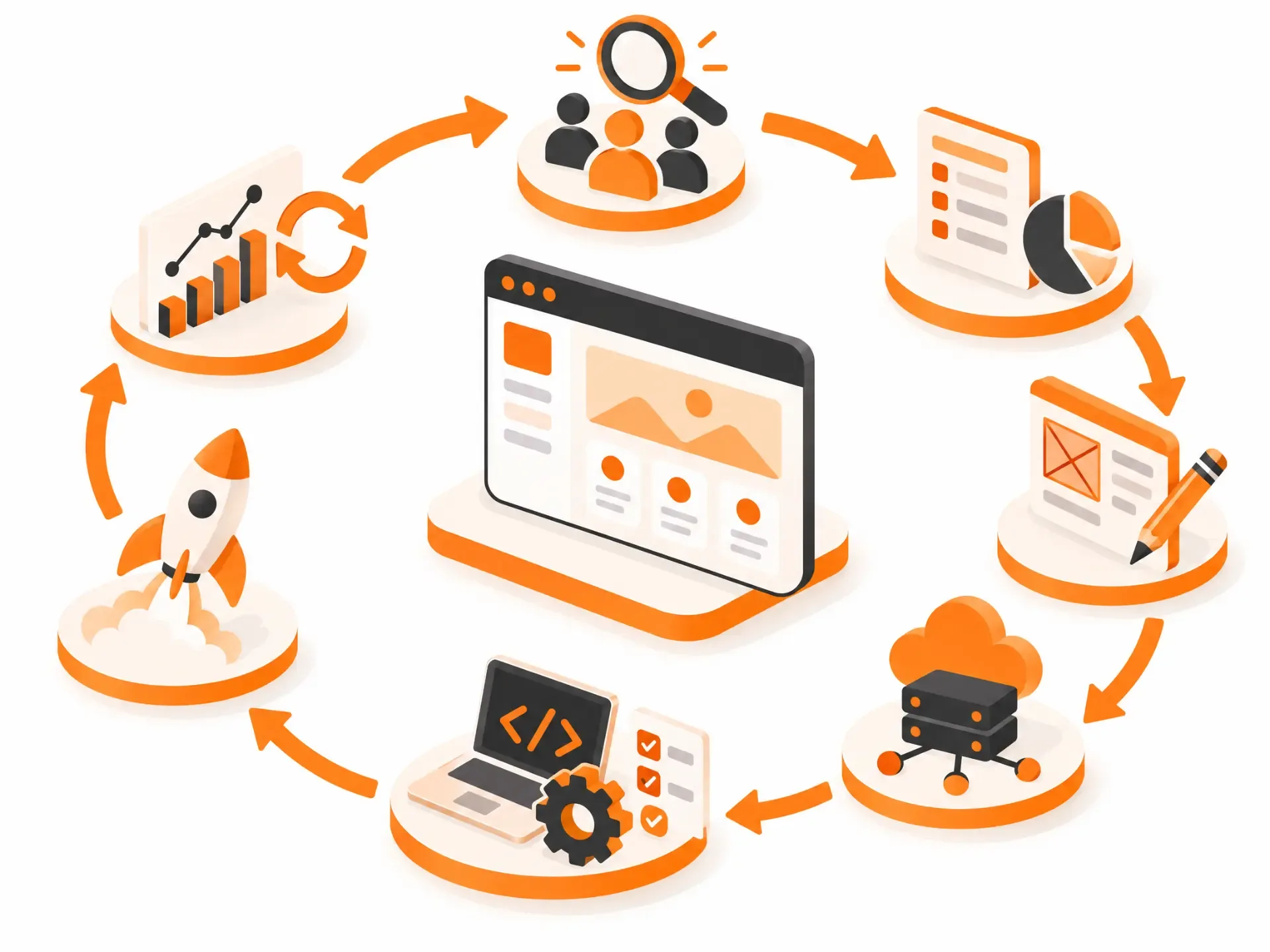
Stage 1: Idea and discovery
Before writing code, make sure you're solving a problem people will pay to fix. Analyses of failed startups, including CB Insights' widely cited post-mortems, consistently rank "no market need" among the top reasons they fail. Discovery is how you avoid joining them.
- Market analysis. Who are the customers, who are the competitors, and where is the gap? Look at what customers already pay for and what they complain about.
- User research. Interviews, surveys and observation of how people do the job today. Ask about their current workarounds rather than whether they'd like your idea.
- Hypothesis testing. Turn assumptions into small experiments: "We believe [this user] will [do this] because [reason]." A landing page, a manual version of the service or ten customer conversations can test a hypothesis in days.
- User personas and use cases. Write down who you're building for and the specific jobs they need done, based on real research. It keeps the whole team arguing about the right things later.
Stage 2: Define the business model
How you charge shapes what you build: per-seat pricing needs user management, usage-based pricing needs metering, and freemium needs limits and upgrade prompts. Decide early whether you'll use flat-rate, tiered, per-seat, usage-based or freemium pricing (most products combine two). We compare these models in more detail in our guide to what SaaS is.
Stage 3: Planning and prototyping
- Software requirements specification (SRS). A written description of what the product must do, for whom, and how you'll know it works. Vague requirements are behind a large share of failed and over-budget software projects.
- UI/UX design. Wireframes to test structure, clickable prototypes to test with real users, then visual design. In SaaS, onboarding deserves special attention: the first session decides whether a trial user comes back.
- Proof of concept (PoC). A small technical experiment to check that the riskiest part can actually be built, such as an AI feature reaching the accuracy you need or an integration that actually works.
- Minimum viable product (MVP). The smallest version real customers will use and pay for. Dropbox famously validated demand with a demo video before the product was finished; its beta waiting list reportedly jumped from about 5,000 to 75,000 people overnight.
Stage 4: Architecture and technical foundation
These are the decisions that are expensive to reverse, so they deserve senior attention.
- Technology stack. Choose based on your product, your team and your hiring market. Common choices include React or Angular on the front end, Node.js, Python, Java or .NET on the back end, and PostgreSQL or MongoDB for data.
- Tenancy model. Most SaaS products are multi-tenant because it's cheaper to run and simpler to update, but some customers require isolation. See the comparison below.
- Cloud provider. AWS, Microsoft Azure and Google Cloud are the three major providers; pick based on your team's experience, the services you need, and where your data has to live.
- Architecture patterns. A well-structured modular monolith is often the right start; microservices, serverless functions and event-driven designs earn their complexity later, when specific parts need to scale independently.
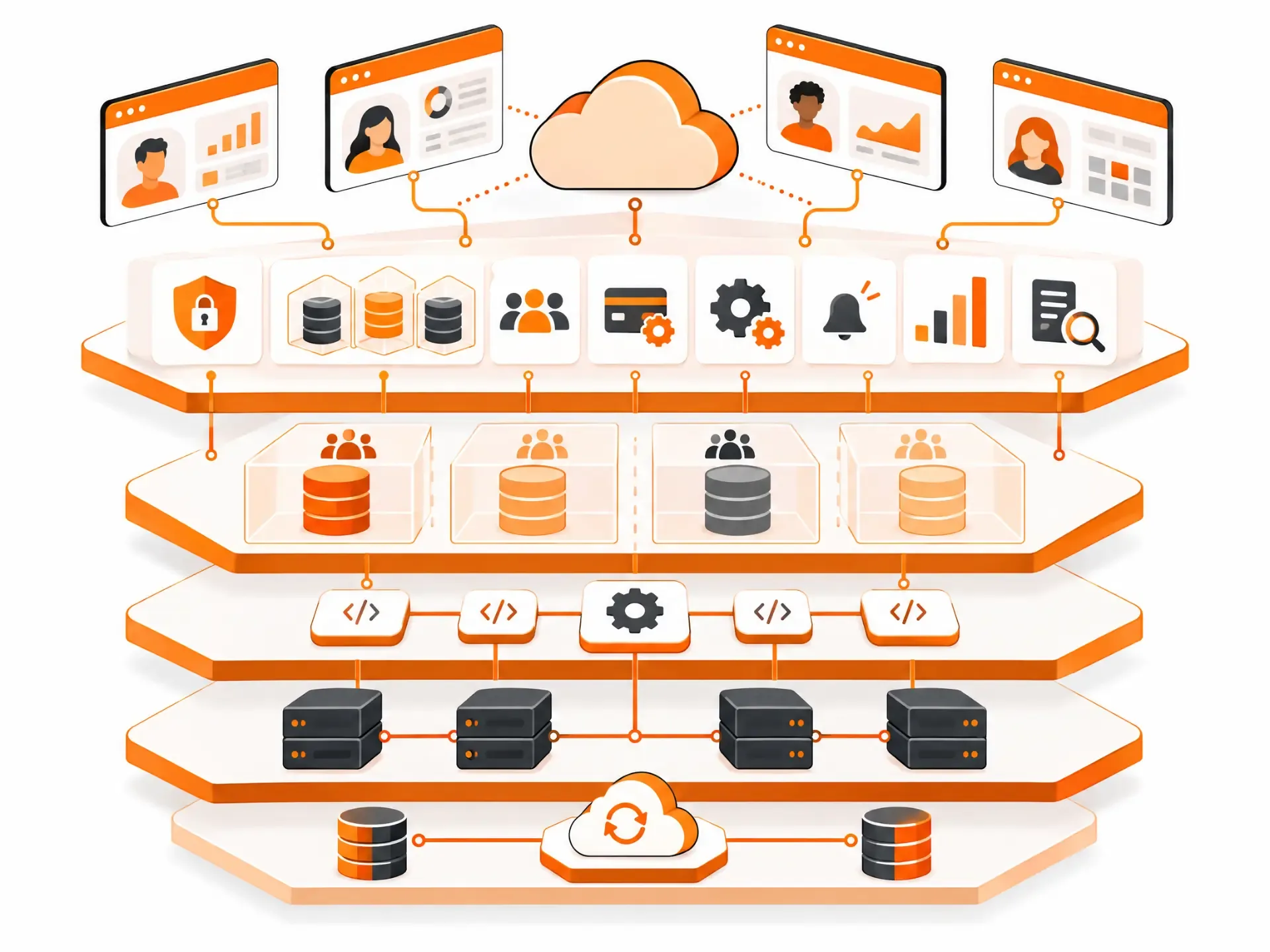
| Single-tenant | Multi-tenant | |
|---|---|---|
| How it works | Each customer gets its own instance and database | Customers share one instance; data is logically separated |
| Cost to run | Higher, grows with every customer | Lower, shared across customers |
| Updates | Rolled out per customer | One release updates everyone |
| Isolation and customization | Strongest | Strong if designed carefully; less per-customer customization |
| Typical fit | Large enterprise or heavily regulated customers | Most SaaS products, especially at launch |
For a deeper comparison of popular full-stack combinations, see MERN vs. MEAN vs. LAMP.
Stage 5: Building the product
- Back-end development. The application logic, data layer, APIs, background jobs and the tenant isolation that keeps customers' data apart.
- Front-end development. The interface customers use: fast, responsive, accessible and consistent across browsers.
- Integration strategy. Use proven services for solved problems (payments, email, authentication) and build only what's unique to you. Payment logic in particular should always be validated on the server. Our API & System Integration team handles this side.
- Mobile apps. Many SaaS products need a companion iOS or Android app sharing the same back end. Planning for that from the start is far cheaper than retrofitting; our mobile app development work covers it.
- AI features. Assistants, search over customer data and automation are increasingly expected, but they need guardrails, evaluation and cost controls, not just an API call.
Stage 6: Quality, security and compliance
Testing in SaaS combines unit tests, integration tests, end-to-end tests of real user journeys, performance tests at realistic load, security testing and user acceptance testing. Automated tests run on every change; manual testing covers judgement calls and edge cases.
Security has to be designed in: encryption in transit and at rest, secure authentication, least-privilege access, secrets kept out of code, dependency updates and regular reviews. It helps to keep two terms straight. Authentication confirms who a user is; authorization decides what they're allowed to do. Many SaaS data leaks happen in the second, when a logged-in user can reach another customer's data.
Compliance depends on your market: GDPR for EU users, HIPAA for US health data, PIPEDA and provincial laws in Canada, and SOC 2 reports for many B2B buyers. For the full pre-launch checklist, see what "production-ready" actually means for a SaaS product.
Stage 7: Launch and beyond
- CI/CD pipeline. Automated build, test and deployment, so every change is tested and can move from development to staging to production safely, with a quick way to roll back.
- Deployment and maintenance. Monitoring, alerting, backups you've actually tested, dependency and security updates, and scaling as usage grows. Maintenance often makes up the majority of a software product's lifetime cost, so clean architecture pays off for years.
- Post-launch strategy. Onboarding that gets users to their first success fast, responsive support, feedback loops into the roadmap, and close tracking of activation, feature adoption and churn.
- SaaS evolution and migration. New features, performance work and, for some products, migration: moving to a different cloud, re-architecting for multi-tenancy, or turning an existing on-premise application into SaaS.
What SaaS Application Development Services Typically Include
If you work with a development partner, a full engagement usually covers some or all of the following:
- SaaS consulting: validating the idea, defining the product, competitive analysis and a technical roadmap.
- UI/UX design: research, wireframes, clickable prototypes and a design system.
- Architecture design: tenancy model, data model, cloud setup and scalability planning.
- Web and mobile development: the product itself, front end and back end.
- API development and integrations: connecting to payments, CRMs, SSO and other systems.
- Testing and QA: automated and manual testing, including performance and security.
- SaaS migration: converting on-premise software to SaaS, or moving between clouds.
- Support, maintenance and evolution: monitoring, fixes, updates and new features after launch.
Managing a SaaS Development Project
Team composition and roles
A typical SaaS build needs a product manager (owns the roadmap and priorities), a UI/UX designer, front-end and back-end developers, a QA engineer and a DevOps or platform engineer. Small, cross-functional teams tend to move faster than large ones split by function. On a lean MVP, one senior person may cover several roles.
In-house vs. outsourcing
An in-house team gives you the most control and deepest product knowledge, but hiring a full team takes months and a significant budget. A development partner gets you to a working product faster and brings experience you'd otherwise have to hire for, with less day-to-day control. Many companies combine the two: internal product leadership, external engineering. Whatever you choose, make sure the code, repositories and cloud accounts are yours from day one.
Feature prioritization
Two simple frameworks keep scope honest. MoSCoW sorts features into Must have, Should have, Could have and Won't have (for now). RICE scores each feature by Reach, Impact, Confidence and Effort, so high-value, low-effort work rises to the top. Neither replaces judgement, but both make trade-offs explicit.
How Much Does SaaS Application Development Cost?
Cost depends mainly on scope, complexity, integrations, compliance requirements and who builds it. Directional ranges for Canada:
| Scope | Typical range (CAD) | Typical timeline |
|---|---|---|
| Focused MVP | $40,000 – $85,000 | 3 – 5 months |
| Scaling product | $90,000 – $200,000 | 6 – 9 months |
| Complex or regulated platform | $200,000 – $400,000+ | 9 – 12+ months |
The main cost drivers are app complexity, the number of integrations, compliance work, AI features, platforms (web only, or web plus mobile), and the team model (in-house, freelance, local agency or offshore). Ongoing costs matter too: plan for hosting, third-party services and roughly 15–20% of the build cost per year in maintenance. For a full breakdown, see SaaS product design and development in Canada and our Application Development Cost guide.
How to optimize SaaS development costs
- Validate the idea first. The cheapest feature is the one you didn't build for nobody.
- Start with an MVP. Launch the core value, then let real usage decide what's next.
- Use pre-built services and APIs. Don't build your own payments, email or authentication.
- Choose proven technology. Boring, well-supported tools are cheaper to hire for and maintain.
- Fix the scope before the build. A paid discovery phase that ends in a fixed scope and price protects you from open-ended costs. We compare the options in fixed-scope vs. time and materials.
Choosing the Right Tools, Platform and Partner
Fast, flexible development tools
Low-code and no-code platforms, and AI coding tools, can get a prototype in front of users remarkably fast, and that's often the right first step. They tend to hit limits around custom logic, security, data portability and scale as the product grows. We cover that trade-off in Vibe Coding vs. Professional App Development, and if you already have an AI-built product, read whether you need to start over.
Advanced security
Whatever you build on, security has to cover the application, the network and the cloud infrastructure, and stand up to the security questionnaires your customers will send.
Scalability
The platform and architecture need to scale up and down with demand, from your first ten customers to your first ten thousand, without a rewrite.
Ecosystem
Good tools come with integrations, libraries and a community. Building on a well-supported ecosystem saves you from reinventing common features.
What makes a credible SaaS development partner
Look for shipped SaaS products you can actually log into, experience with multi-tenancy and subscription billing, clear answers on security and compliance, a defined post-launch plan, and written confirmation that you own the code. Expertise and experience matter, but so does how a partner communicates when something goes wrong.
SaaS in Action: A Case Study and Examples
Slack is a useful example of SaaS done right. It began as an internal chat tool at a game studio; the team realized the communication tool was more valuable than the game itself. They launched a focused product that solved one problem (too much internal email), invested heavily in user experience and integrations, and grew through a freemium model. The lessons are the ones this guide keeps returning to: solve a real problem, start focused, and let usage guide what comes next.
Other familiar examples include Zoom (video meetings), Shopify (online stores), HubSpot (marketing and CRM), Figma (design) and Canva (graphics). Each started with a narrow, valuable core and expanded from there.
Common Mistakes in SaaS Application Development
- Building before validating that anyone will pay.
- Treating multi-tenancy, billing or roles and permissions as features to "add later."
- Launching without monitoring, tested backups or a rollback plan.
- Piling features onto a prototype instead of hardening it first.
- Ignoring onboarding, then wondering why trial users never convert.
- Budgeting for the build but not for running and maintaining the product.
Future Trends in SaaS Application Development
- AI and machine learning. Assistants, search over customer data, predictions and automation are becoming standard features rather than extras.
- Vertical SaaS. Products built deeply for one industry, with its workflows and compliance built in.
- Micro-SaaS. Small, focused products run by tiny teams, often as add-ons to larger platforms.
- Security enhancements. Zero-trust access, continuous verification and compliance automation.
- Integration capabilities. Customers expect every tool to connect with the rest of their stack, so a strong API is now part of the product.
How We Approach SaaS Application Development at App-Scoop
We start every SaaS project with a paid, fixed-fee Execution Blueprint: an audit of architecture, integrations, security and delivery risk, a clickable prototype, and a final scope, timeline and fixed price. The build follows in two-week sprints against that Blueprint, then a launch and stabilization phase, backed by our Zero-Defect Guarantee for documented functionality. The typical path to production is about 120 days, depending on scope. We build SaaS products alongside web applications and mobile apps, with ChatGPT & LLM Integration and AI Workflow Automation when a product needs AI. See how we approach production-ready SaaS development, or get in touch for an honest read on your idea.
Frequently Asked Questions
What is SaaS application development?
It's the process of designing, building, hosting and continuously improving software that customers access over the internet on a subscription. The company that builds it also runs it, including hosting, security, updates and support.
What is a SaaS development company?
A company that specializes in building SaaS products: multi-tenant architecture, subscription billing, cloud infrastructure, security and the ongoing releases SaaS requires. Good ones also help with discovery, design and post-launch support.
What's the first step in building a SaaS application?
Market and user research. Confirm there's a real problem, a specific audience and willingness to pay before investing in design or development.
How long does it take to build a SaaS application?
A focused MVP typically takes 3 to 5 months. A scaling product takes 6 to 9 months, and complex or regulated platforms 9 to 12 months or more. Timelines depend far more on scope and integrations than on the technology.
Can a SaaS product be delivered faster?
Sometimes. A tightly scoped MVP, proven technology, pre-built services and a team experienced in SaaS all shorten timelines. What you shouldn't cut is the discovery work, security and testing, since those shortcuts usually cost more time later.
How much does it cost to develop a SaaS app?
In Canada, roughly CAD $40,000-$85,000 for a focused MVP, $90,000-$200,000 for a scaling product, and $200,000 or more for complex or regulated platforms. Budget separately for hosting, third-party services and ongoing maintenance.
What are the common business models for a SaaS app?
Flat-rate subscriptions, tiered plans, per-seat pricing, usage-based pricing and freemium. Most products combine two, such as tiered plans with per-seat pricing at the higher tiers.
What's the difference between a SaaS application and a SaaS platform?
An application does a specific job; a platform is a foundation others build on through APIs, extensions or a marketplace. Most products should start as a focused application.
Should my SaaS be single-tenant or multi-tenant?
Most SaaS products start multi-tenant because it's cheaper to run and easier to update. Single-tenant setups make sense for customers who require full isolation, often in large enterprise or regulated industries.
Which tech stack is best for SaaS?
There's no single best stack. React with Node.js or Python and PostgreSQL is a common, well-supported choice; .NET or Java suit enterprise environments. Pick based on your product's needs, your team's skills and the hiring market.
What's the difference between authentication and authorization?
Authentication confirms who a user is; authorization decides what they're allowed to see and do. In multi-tenant SaaS, authorization is what keeps one customer from seeing another's data.
What are the main benefits of an MVP?
An MVP gets the core product in front of real users quickly, so you can test demand, learn what matters and avoid spending months building features nobody uses.
How important is UI/UX design in SaaS?
Very. In SaaS, users can cancel any month, so a confusing product is churn waiting to happen. Good onboarding in particular has a direct effect on trial conversion and retention.
What is a CI/CD pipeline?
An automated workflow that builds, tests and deploys every code change. It lets a SaaS team release small improvements often, with tests catching problems before customers do and a quick way to roll back.
Can I turn my existing software into SaaS?
Yes. It usually means re-architecting for multi-tenancy, moving to cloud hosting, adding subscription billing and building the operational side (monitoring, backups, support). The work varies a lot depending on how the current software is built.
Can I build a SaaS product with no-code or AI tools?
You can build a prototype or an early version, and that's often a smart way to validate an idea. As the product grows, most teams need custom development for security, performance, complex logic and data portability.
Do I need a mobile app for my SaaS product?
Not always. Many B2B SaaS products start as web apps. A mobile app makes sense when users need the product on the go, need device features such as the camera or notifications, or work in the field.
What happens after launch?
Launch starts the operating phase: monitoring, fixing issues, supporting users, shipping improvements and tracking retention. Make sure your contract defines post-launch support, and budget for ongoing maintenance.
How do I avoid vendor lock-in with a development partner?
Own the code, repositories and cloud accounts from day one, insist on documentation, and agree in writing how knowledge is handed over if you change partners or bring development in-house.
Can a development partner help turn my SaaS idea into a product?
Yes. A good partner starts with discovery: validating the idea, defining scope and building a prototype before full development, so you invest in the build with evidence rather than hope.
How do I protect my SaaS idea when talking to developers?
Sign a non-disclosure agreement before sharing detailed plans, and make sure your development contract assigns all code and intellectual property to you.
Have a project in mind?
Let's talk about how we can build it. Free consultation, no obligation.
Get a Free Consultation